

Key takeaways
- AI website builders like Lovable and Base44 are the fastest way to get a site live. WordPress is built for sites that a team keeps updating for years.
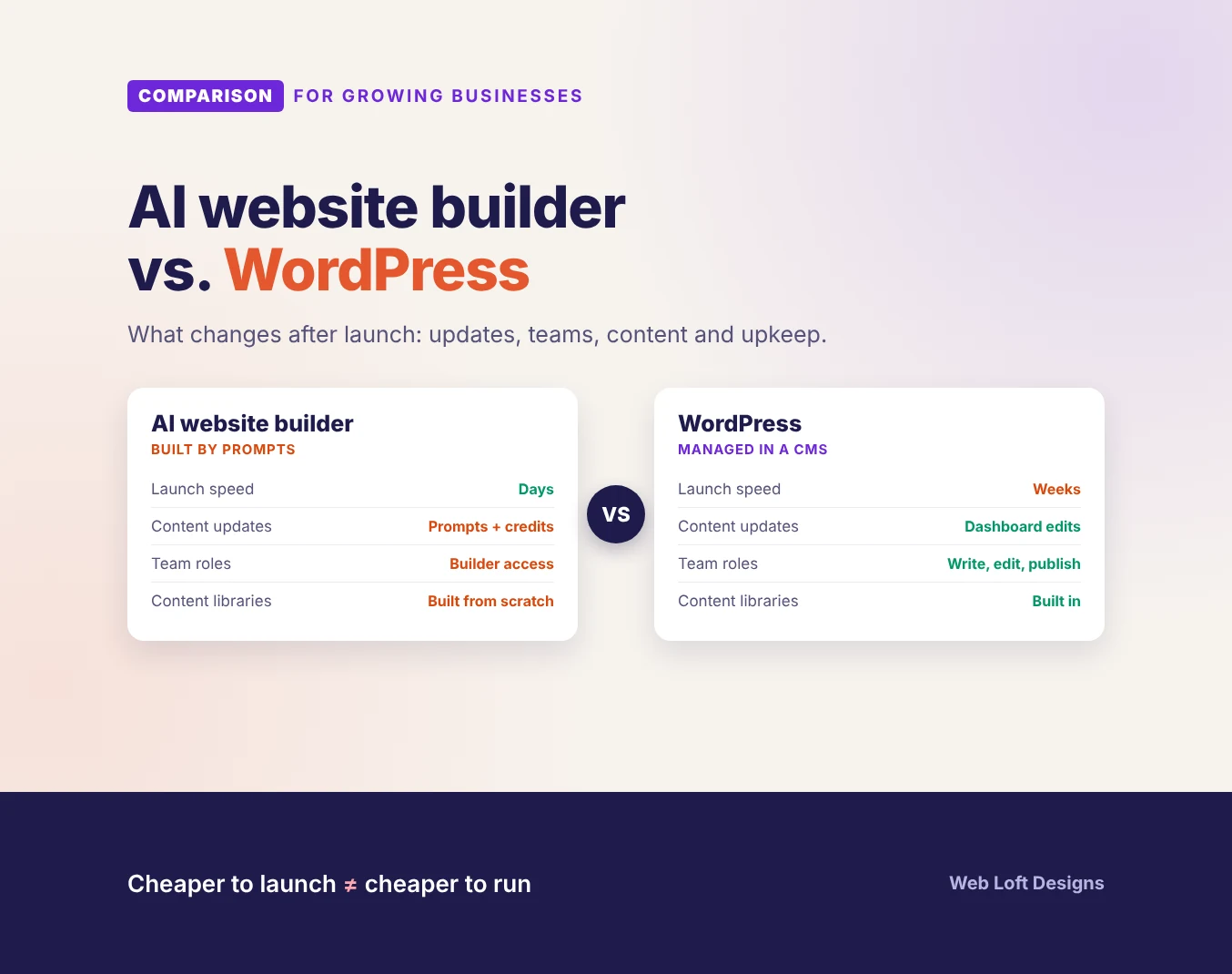
- On an AI builder, most changes beyond simple text edits are made by prompting the AI, and those changes usually use credits. On WordPress, content is edited in a CMS that anyone on your team can use.
- For a growing business, the real differences show up after launch: who updates the site, how a team approves changes, and how blogs, case studies and resource libraries are managed.
- An AI builder is often cheaper to launch. It isn’t always cheaper to run, especially once frequent updates, fixes and SEO work are counted.
- AI builders are a strong fit for prototypes, single landing pages and short-term sites. WordPress is a better fit when the website is a long-term sales and content channel.
AI website builders have changed what it takes to launch a website. Describe your business, and a few minutes later you have a polished, multi-page site. Next to that, WordPress can look slow and complicated, and many business owners now ask the obvious question: why not use the AI builder and skip the rest?
The assumption behind that question is that an AI builder is simpler and cheaper. For some websites, it is. For a growing business that publishes content, has a team, and depends on the site for leads, the answer looks different once the site is live.
As a web design agency, we build most client sites on WordPress, so we have an obvious point of view. To keep this comparison fair, we built and edited a test site with Lovable and documented what day-to-day management actually looked like. This guide covers both sides, including when an AI website builder is the better choice.
The short answer
| An AI website builder is a good fit if… | WordPress is a better fit if… |
|---|---|
| You need a site or landing page live this week | The site will be updated regularly for years |
| One person makes all the changes | Several people write, edit or approve content |
| The site has a handful of pages that rarely change | You publish blogs, case studies, products or resources |
| You’re testing an idea, offer or campaign | Search traffic and leads are part of your growth plan |
| You’re building an app-like tool, not a content site | You want to own your site and choose your own developers and host |
How each one works
The two approaches solve different problems, and the difference explains most of what follows.
An AI website builder generates code from your instructions. You describe what you want, and the AI writes and updates the code behind the site. To change the site, you usually describe the change again. Lovable and Base44 are both built this way. They’re closer to an AI developer than to a traditional website builder.
WordPress is a content management system (CMS). The design and functionality are built once, by you or a developer. Content such as pages, blog posts, team members and case studies is stored separately and edited through a dashboard. Updating a page doesn’t require touching the code or asking anyone to rebuild it.
So the question isn’t only which tool builds a better site. It’s how your business will manage that site after launch.
Content management: who updates the site?
Most business websites change constantly: new services, seasonal offers, team updates, blog posts, project photos, price changes. On a growing business’s site, these updates add up to dozens of changes a month.
On an AI website builder
Small text changes are easy. Lovable lets you click text in the preview and edit it directly, and it offers a set number of free inline text edits per day. Base44 also offers free manual edits in its editor.
Anything beyond a quick text fix, such as adding a section, a new page, a new team member or a new FAQ, is typically done by prompting the AI. According to Lovable’s documentation, building changes use credits that vary with the size of the request, and Base44’s credit system works similarly. Every meaningful content update becomes a small development task with a cost attached.
Our test site showed what that looks like day to day:
- Edits needed planning. When we asked for five new location pages, Lovable first prepared a plan and waited for approval before building. Each step had a credit cost to keep in mind.
- Changes didn’t always reach the live site. After we had one page rewritten, the new version appeared in the editor preview, but the live site still showed the old one, even though the publish panel said the site was up to date.
- The AI filled gaps on its own. When we gave it no details, it added neighborhood names and claims about the business that we never provided. We cover this in our guide to creating location pages with AI.
None of these issues was hard to work around. But each one required someone who understood how the builder works.
On WordPress
Content lives in the dashboard. Anyone with access can edit a page, add a blog post, swap a photo, schedule a post for next Tuesday, or roll back to an earlier version using built-in revisions. Changes cost nothing beyond the time it takes to make them, and what you save is what visitors see.
The tradeoff is that WordPress has a learning curve, and the experience depends on how well the site was built. A well-built WordPress site makes common updates simple. A poorly built one can be as frustrating as any other tool.
Team editing and approvals
As a business grows, more people touch the website: a marketing coordinator writes blog posts, a manager approves them, a sales lead updates a case study, an outside agency handles SEO.
AI builders are designed around the person building the app. Lovable has workspace roles such as owner, admin, editor and member, and it shares one credit balance across the workspace, with limits that owners can set. These roles control who can build and how many credits they can use. They aren’t content roles. There’s no built-in way for one person to draft a blog post and another to review and publish it.
WordPress has content roles built in. Its standard user roles separate who can write, who can edit and who can publish. A Contributor can write a post but can’t publish it. An Editor can review, edit and publish anyone’s posts. An Administrator manages the site itself. That structure lets a team work on the site without anyone being able to break the design or publish something by accident.
Product, resource and content libraries
Growing businesses rarely stop at five pages. Over time, they add a blog, case studies, a project gallery, product pages, downloadable resources, job listings or event pages. Each of these is a library of similar items that need consistent layouts, categories, filters and search.
On WordPress, this is what the platform was built for. Each library becomes a content type with its own fields, categories and templates. Adding the 50th case study works exactly like adding the first: fill in the fields, and the layout, listing pages and internal links update automatically.
On an AI builder, a library is something you build. It’s possible to create a blog or a resource center, sometimes backed by a database, but you’re designing the content structure, the admin screens and the listing logic through prompts. In effect, you’re building a small CMS, and every later change to how that library works is another development task.
Maintenance and ownership
Neither option is maintenance-free. The maintenance just looks different.
WordPress needs regular upkeep. Core, theme and plugin updates, security monitoring, backups and hosting all have to be handled, either by you or by a maintenance plan. Skipping them is how WordPress sites get hacked or break. This is the strongest argument against WordPress, and it’s a fair one.
AI builders handle hosting, but you depend on the platform. Lovable hosts published sites for free, which removes much of the technical upkeep. In exchange, the platform decides how your site is built and served. Those decisions can change: Lovable switched new projects to server-side rendering in May 2026, for example, which improved how search engines see new sites but left older projects on the previous setup until they’re upgraded. Your ability to make changes also depends on having credits available.
Ownership works differently too. A WordPress site can move to any host and be maintained by any developer. An AI-built site can usually be exported as code, but taking it elsewhere means maintaining a custom application without the AI builder, a job for a developer rather than a content editor.
Is an AI website builder really cheaper?
Often, at the start. An AI builder can produce a working site for the cost of a monthly plan, while a professionally built WordPress site requires design and development upfront.
The comparison changes when you look past launch:
| Cost area | AI website builder | WordPress |
|---|---|---|
| Launch | Low: a subscription and your time | Higher: design and development |
| Routine content updates | Credits for anything beyond simple text edits | Staff time only |
| New sections and features | Credits, plus time to review and fix the result | Developer time, or existing components |
| Hosting and upkeep | Included in the platform | Hosting plus maintenance |
| SEO cleanup | Often needed after a fast launch | Depends on how the site was built |
For a site that rarely changes, the AI builder usually stays cheaper. For a site that is updated every week by several people, the costs of prompting, reviewing and fixing changes can add up, and so can the cost of the time spent learning the builder’s quirks.
SEO and AI search visibility
Both options can rank. Neither ranks automatically.
AI builders have improved quickly, but our tests found gaps that a business owner could easily miss: no XML sitemap by default, no canonical tags, no structured data, and FAQ answers that didn’t exist in the page HTML until a visitor clicked them. We cover these in our Lovable and Base44 SEO checklist and our test of how Google and AI search tools see AI-built sites.
WordPress has mature SEO tooling, and plugins handle sitemaps, canonical tags and structured data out of the box. But a WordPress site can still have thin content, slow pages or indexing problems if it isn’t built and maintained well. Our guide to pages Google crawls but doesn’t index includes a cleanup we did on a WordPress site.
The bigger SEO difference is content. Sites that rank and get cited by AI tools usually publish consistently. The easier it is for your team to publish, the more likely that is to happen.
Is WordPress still relevant?
Yes. According to W3Techs, WordPress powers 38.4% of all websites and 57.3% of websites with a known CMS as of November 2026. It’s still the most widely used way to run a content-driven website, with a large pool of developers, hosts and tools around it.
AI builders aren’t replacing that. They’re adding a new option for a different kind of project, and for many businesses the two can work together: an AI builder for a quick campaign page or internal tool, and WordPress for the main website.
When an AI website builder is the right choice
- Validating an idea. A new offer, product or business concept that needs a page to test demand.
- A short-term campaign or event. A site that will be live for weeks or months, not years.
- A single landing page. One page, one goal, few updates.
- An app-like tool. Calculators, portals, dashboards and internal tools, where AI builders are especially strong.
- A very small business with one decision-maker. If one person makes every change and the site rarely changes, the simplicity is real.
Signs it’s time to move to WordPress
- More than one person needs to update the site.
- You’re publishing, or want to publish, blog posts, case studies or resources regularly.
- Routine updates are using more credits, or more of your time, than expected.
- Changes sometimes break other parts of the site or don’t show up where you expect.
- Search traffic matters to your business, and the site needs ongoing SEO work.
- You want full control over your site, your host and who maintains it.
Moving doesn’t mean starting over. Your content, design direction and lessons from the first site carry over. The key technical step is setting up redirects from the old URLs so you keep any search visibility the site has built.
Need help choosing, or moving?
If your AI-built site is starting to feel like a project instead of a tool, our team can help. We’ll look at how your business uses the site, whether it makes sense to keep it, improve it or move it to WordPress, and what that move would involve. Learn more about our website design and development services, or start with our free Technical SEO Audit to see how your current site is performing in search.
Frequently asked questions
Is WordPress still relevant in 2026?
Yes. WordPress powers 38.4% of all websites and 57.3% of sites with a known CMS, according to W3Techs data from November 2026. It remains the most common choice for business websites that are updated regularly and managed by a team.
Is Lovable better than WordPress for a small business?
It depends on how the site will be used. Lovable is faster for launching a small site or testing an idea. WordPress is better suited to a site that several people update, that publishes content regularly, or that the business plans to grow for years.
Can non-technical team members edit an AI-built website?
Partly. Lovable and Base44 allow simple text edits without prompts, but most other changes, such as new sections, pages or content types, are made by prompting the AI and usually use credits. WordPress lets team members edit content through a dashboard, with roles that control who can write, edit and publish.
Is an AI website builder cheaper than WordPress?
Usually at launch, not always over time. An AI builder avoids upfront design and development costs, but frequent updates, new features and SEO fixes can add credits and time. WordPress costs more to build but less to update, with hosting and maintenance as ongoing costs.
Can I move a Lovable or Base44 site to WordPress?
Yes, but it’s a rebuild rather than a direct transfer. The content and design direction can carry over, and redirects from the old URLs to the new ones protect the search visibility the site has built.