


Key takeaways
- Location pages can bring in local search traffic, but only when each page offers something a visitor in that area can’t get from your other pages.
- Google doesn’t penalize location pages for being made with AI. It targets doorway pages and mass-produced pages that add no value, however they were created.
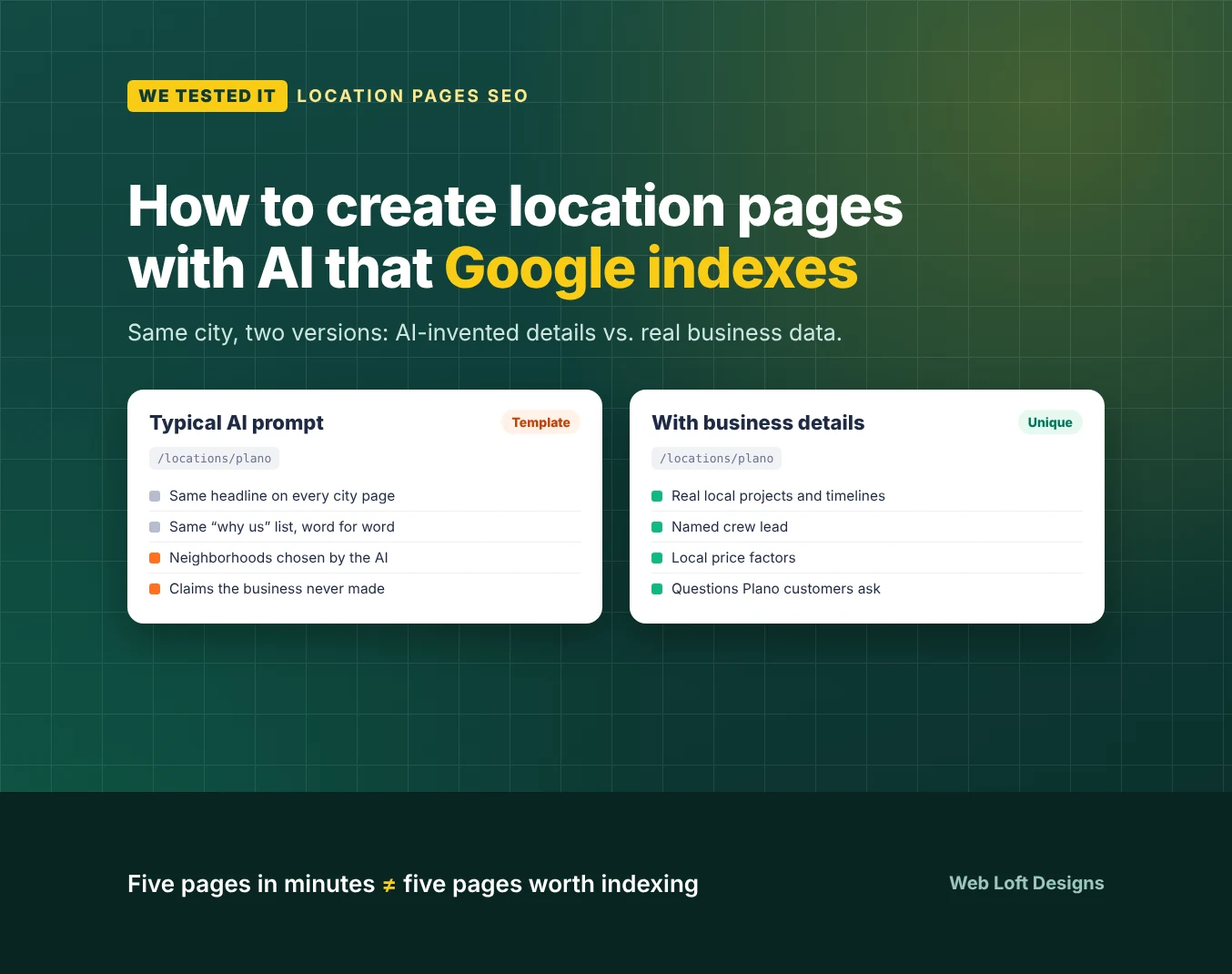
- In our test, an AI website builder made five city pages in minutes. They shared one template, and the “local” details that made them look different were invented, including a neighborhood from the wrong city.
- When we gave the same builder real business details for one city, it produced a page built on projects, pricing factors and questions that only that business could answer.
- Use AI for structure and drafting. The facts that make each page unique have to come from the business, and Google now says AI content should be fact-checked before it is published.
Location pages are one of the most common ways service businesses try to show up in nearby cities. A painter based in Dallas wants to appear for “painters in Plano,” so it creates a Plano page. Then a Frisco page, an Irving page and a dozen more.
AI tools have made this nearly effortless. Website builders like Lovable can produce a full set of city pages from a single sentence. That speed is exactly why location pages SEO deserves a closer look: the same tools that make it easy to create pages also make it easy to create pages Google has no reason to index.
To see what happens in practice, we asked an AI website builder to create location pages for a test site, then compared the result with a version built from real business details. This guide covers what Google’s policies say, what our test found, and how to build local landing pages that are worth indexing.
What makes a location page useful
A location page, sometimes called a local landing page or city page, is a page about your services in a specific area. For businesses that travel to customers, such as contractors, cleaners and home service companies, these pages often double as service area pages.
A good location page answers the questions someone in that area has before they call:
- Do you actually work here, and what have you done nearby?
- What are the common jobs, problems or requirements in this area?
- What affects the price for a project like mine?
- Who will show up, and how far ahead do I need to book?
If a page answers those questions with specifics, it gives searchers and search engines a reason to choose it. If it only repeats your general services with a new city name, it doesn’t.
What Google says: doorway pages and scaled content abuse
Two of Google’s spam policies apply directly to location pages.
Doorway pages
Google describes doorway abuse as pages created to rank for specific, similar search queries that lead users to less useful intermediate pages. One of its examples is pages “targeted at specific regions or cities that funnel users to one page.” A set of city pages that all say the same thing and push visitors to the same contact form fits that description.
Scaled content abuse
Scaled content abuse covers many pages generated mainly to manipulate rankings rather than help users. Google is explicit that this applies no matter how the content is created, and it lists “using generative AI tools or other similar tools to generate many pages without adding value for users” as an example.
AI isn’t the problem. Missing value is.
Google’s guidance on generative AI content doesn’t prohibit using AI. In an update on October 1, 2026, Google added that generative models predict likely words rather than retrieve facts, and that it is critical to manually fact-check and review AI-generated content before publishing. That review extends to titles, meta descriptions, structured data and image alt text.
For location pages, that guidance matters even more than usual, as our test showed.
We tested it: AI-generated location pages, before and after
We used a test website we had built with Lovable for a fictional Dallas painting company. The site already had home, services, about and contact pages.
Round 1: a typical prompt
We asked Lovable to add location pages for five cities the business serves: Plano, Richardson, Irving, Garland and Frisco, each with its own URL. We didn’t ask for unique content or give any local details, because most business owners wouldn’t.
Before building the pages, Lovable offered optional follow-ups, including “Plan unique city content” and “Set page SEO details.” We chose the default option and let it build.
The five pages were ready in minutes. Each had its own title and meta description, and all five were linked from the footer and the About page. On the surface, they looked like five distinct pages. Underneath, they shared one template:
- The same headline pattern on every page: “[City] painting, done right.”
- The same four-point list of reasons to hire the company, word for word
- The same sections in the same order: three featured services, a neighborhood list, a local tip, links to the other cities, and the same call to action
The parts that changed were the introduction, the three services, the neighborhood list and the tip. None of that came from the business. The AI filled those sections with details that sounded local:
- Claims the business never made. One page said many of the company’s repeat customers live in Garland. Another said its crews work in Plano every week. The Garland page also said the company tests for lead paint, a service that comes with legal requirements the business never mentioned.
- A neighborhood in the wrong city. The Frisco page listed Panther Island as one of the areas the crews work in most. Panther Island is in Fort Worth, more than 30 miles away.
- Names we couldn’t verify. Several other listed neighborhoods didn’t match any community we could find, and one matched a local street name rather than a neighborhood.
These pages would likely pass a quick glance, and some would probably pass a basic duplicate-content check. But the differences between them were cosmetic. A visitor in Frisco learned nothing about the company’s actual work in Frisco, and a few of the details were simply wrong.

Round 2: the same page with real business details
Next, we asked Lovable to rewrite only the Plano page using a short list of business details, and told it not to add any neighborhoods, claims or statistics that weren’t on the list. Because the company is fictional, we wrote these details ourselves, the way a business owner would describe their own work:
- Two recent Plano projects, with the products, colors and timelines
- The name and tenure of the Plano crew lead
- The most common Plano request and why it takes extra prep
- The factors that affect price in Plano
- Two questions Plano customers ask, with answers
The rewritten page followed the instructions. The invented neighborhood list, the generic four-point list and the unsupported claims were gone. In their place were sections that no other page on the site could share.

| Section | Round 1: typical prompt | Round 2: business details |
|---|---|---|
| Introduction | Crews work in Plano every week (not supplied by the business) | The most common Plano job: exterior repaints on 1990s homes that need extra scraping and caulking |
| Proof of local work | A list of neighborhoods the AI chose | Two recent Plano projects with products, colors and timelines |
| People | None | The Plano crew lead and his years with the company |
| Pricing | None | Four factors that affect price in Plano |
| Customer questions | None | Two Plano FAQs about HOA approval and booking lead time |
| Shared with other city pages | Headline pattern, four-point list, section order, call to action | Headline pattern and call to action |
What still needed work
The second version was much stronger, but it wasn’t finished:
- The photo was generic. The page used a stock-style image of a house being painted, not a photo of the projects it described. Real project photos would support the claims on the page far better.
- The headline was still the template. It kept the “[City] painting, done right” pattern used on every other city page.
- The FAQ was an accordion. In our test of how Google and AI tools read AI-built sites, this type of component left the answers to closed questions out of the page HTML entirely. Answers that matter for search should be in the page even when they’re collapsed.
The lesson from both rounds is the same: AI did a good job with structure, layout and wording. The value of each page came from the details the business provided, and when those details were missing, the AI made them up.
The swap test: is your location page unique enough?
Here is a quick way to check any location page, whether a person or a tool wrote it. Remove the city name, then ask whether a reader could tell which city the page is about.
- If they couldn’t, the page is a template with a city name in it, the kind of near-duplicate Google often leaves out of its index.
- If they could, check where the details came from. Neighborhood names, local tips and claims about your work only count if they’re accurate and come from your business. Our first-round pages would have partly passed the swap test, but only because of details the AI invented.
A page passes when its unique details are real, specific and useful to someone in that area.
What to include on every location page
The most useful local landing pages are built from information only your business has. Use this as a checklist when planning each page.
| Element | Why it matters | Example |
|---|---|---|
| Local projects | Proves you work in the area | Exterior repaint near a named street, with products and timeline |
| Real photos | Supports your claims and sets the page apart visually | Before and after photos from a job in that city |
| Common local jobs | Matches what people in that area actually search for | Older homes that need extra prep, or newer builds with HOA rules |
| Price factors | Answers the question most visitors have | Home height, trim, repair work, approval time |
| Team | Builds trust before the first call | The crew lead or office that serves the area |
| Local rules and requirements | Shows expertise specific to the area | Permits, HOA approvals, inspection requirements |
| Local questions and answers | Gives search engines and AI tools direct answers to quote | “How far ahead should I book in spring?” |
| Reviews from that area | Adds third-party proof | Real customer reviews that mention the city or project |
Shared elements like your phone number, service list and contact form can stay the same across pages. What shouldn’t repeat is the main content.
How to use AI to build location pages the right way
- Collect the facts first. For each city, gather projects, photos, common requests, price factors, local requirements and customer questions. If you can’t fill most of this list for a city, that city may not need its own page yet.
- Give the AI the facts and the limits. Tell it exactly what to use and what not to add. In our test, one sentence made a large difference: “Do not add any neighborhoods, claims or statistics that are not listed here.”
- Let AI handle what it does well. Page structure, headings, clear wording and consistent formatting are where AI saves real time.
- Fact-check every page before publishing. Check neighborhoods, service claims, certifications and numbers, as well as titles, meta descriptions and image alt text. This is now part of Google’s own guidance for AI-generated content.
- Build the pages into your site. Link each location page from related service pages, project pages and blog posts, not only from the footer. Our guide to internal linking for SEO explains how.
If your site was built with an AI builder, our Lovable and Base44 SEO checklist covers the technical checks to run before and after you add new pages.
How many location pages do you need?
There is no ideal number. A page per city makes sense when each city has enough real material to fill it. A useful rule of thumb:
- Create a dedicated page for cities where you have an office, a steady volume of work, real projects to show and enough local details to pass the swap test.
- Use one service area page for smaller or occasional areas. A single page that lists the communities you serve, with a few examples, is more useful than a dozen thin pages.
- Add pages as you earn them. When a city starts producing projects, reviews and questions, it’s ready for its own page.
Five strong location pages will usually do more for your business than fifty that say the same thing.
Already published dozens of AI-generated location pages?
If your site already has a large set of similar city pages, start with Google Search Console. Pages listed as “Crawled – currently not indexed” are often a sign that Google sees them as too similar. Our guide to crawled – currently not indexed covers that status in detail. Then sort the pages into three groups:
- Improve pages for cities where you have real work and details to add.
- Merge pages for smaller areas into a service area page, and redirect the old URLs to it.
- Remove pages for areas you don’t actually serve.
Also review every page for invented details. Remove neighborhoods, claims, certifications or statistics that didn’t come from your business. An inaccurate location page can cost you trust with customers as well as visibility in search.
Get help building location pages that rank
Location pages work when they’re built on real information about your business and your service areas. Our team can review your existing city pages, identify which ones are holding your site back, and plan local landing pages that are worth indexing. Start with our free Technical SEO Audit to see which of your pages Google is indexing and which ones it is skipping.
Frequently asked questions
What are doorway pages?
Doorway pages are pages created to rank for similar searches, such as the same service in different cities, that don’t offer much on their own and funnel visitors to another page. Google’s spam policies list pages targeted at specific regions or cities that funnel users to one page as an example.
Are AI-generated location pages against Google’s guidelines?
Not by themselves. Google’s policies focus on whether pages add value, not how they were made. Using AI to generate many pages without adding value for users is listed as scaled content abuse, and Google recommends fact-checking all AI-generated content before publishing.
How many location pages should a business have?
As many as you can fill with real, specific information. Create dedicated pages for the cities where you have an office, regular work and local projects to show, and cover smaller areas on a single service area page.
What should a location page include?
Local projects and photos, the jobs you do most often in that area, factors that affect price, the team that serves the area, local requirements such as permits or HOA approvals, and answers to questions customers in that area ask.
Can I use the same template for all my location pages?
Yes, for layout and shared elements like your contact details and call to action. The main content should be different on each page. If the pages would still make sense after swapping the city names, they’re too similar.