Key takeaways
- Your browser, Googlebot and AI crawlers don’t always see the same version of a page. What each one sees depends on what is in the HTML your server sends.
- Googlebot renders JavaScript. Based on available measurements, most AI crawlers, including GPTBot, ClaudeBot and PerplexityBot, don’t.
- We built a test site with Lovable. All page content was in the initial HTML, so the old “Lovable sends an empty page” problem didn’t apply.
- The test still showed a gap: three of four FAQ answers didn’t exist in the HTML until a visitor clicked them. Crawlers don’t click, so those answers were invisible to search engines and AI tools.
- To check your own site, compare the raw HTML with what you see in the browser, look closely at collapsed and tabbed sections, and use Google’s own testing tools.
When someone visits your website, their browser downloads the page, runs its JavaScript and shows the finished result. Search engines and AI tools don’t always work that way. Some run JavaScript, some don’t, and none of them click around the page the way a person does.
For websites built with AI builders like Lovable and Base44, that difference matters. These tools generate JavaScript-based sites, and what search engines and AI assistants can read depends on how those pages are delivered. To see what actually happens today, we built a test site with Lovable and checked exactly what Google and AI crawlers receive.
This guide explains how each type of visitor reads a page, what our test found, and how to check your own AI-built site.
Three visitors, three different versions of your page
Every page on your site is read by at least three kinds of visitors:
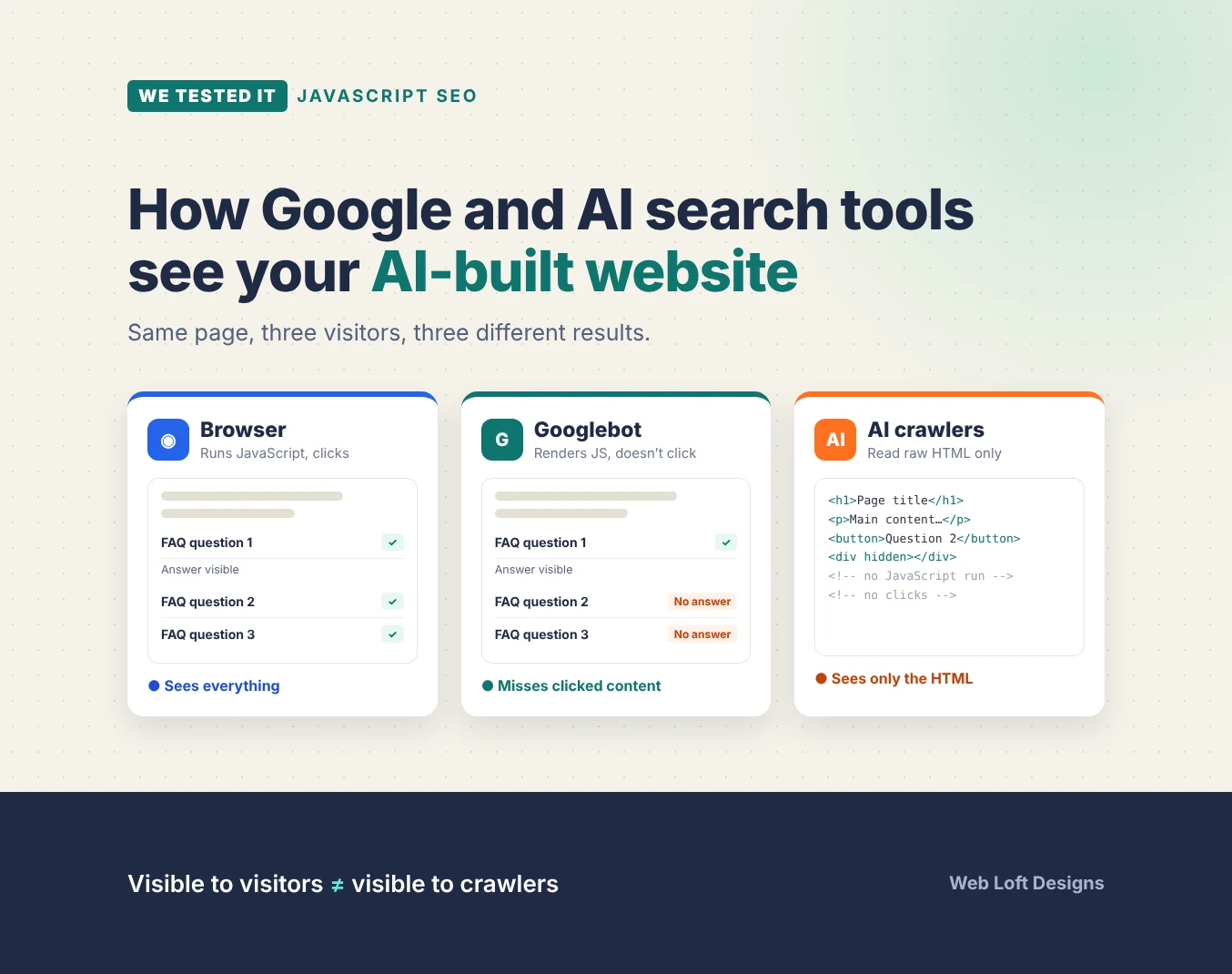
- A person in a browser. The browser downloads the HTML, runs all the JavaScript, and lets the person click, scroll and open menus. They see the complete page.
- Googlebot. Google downloads the HTML, then renders the page with a headless version of Chrome, which runs the JavaScript. It does not click buttons or open menus.
- AI crawlers. Bots that collect content for AI assistants and AI search, such as OpenAI’s GPTBot and OAI-SearchBot, Anthropic’s ClaudeBot and PerplexityBot. Most of them read the HTML the server sends and don’t run JavaScript at all.
The common ground is the initial HTML. Content that is in the HTML when the server sends it can be read by all three. Content that only appears after JavaScript runs, or after someone clicks, may be missed by some or all crawlers.
How Googlebot handles JavaScript
Google processes JavaScript pages in three stages: crawling, rendering and indexing. According to Google’s JavaScript SEO basics, pages are placed in a render queue, where they may wait “for a few seconds, but it can take longer than that.” Once rendered, Google indexes the page based on the rendered HTML.
Two points matter here:
- Rendering adds a step. Google can index JavaScript content, but pages that depend on rendering go through an extra stage before Google sees their full content. Google itself says server-side rendering or pre-rendering is “still a great idea,” partly because not all bots can run JavaScript.
- Google doesn’t interact with the page. Google’s Martin Splitt has said plainly that “Googlebot does not click on buttons.” Content that only loads after a click, such as a “Load more” button, may never be indexed. Google’s guidance is also clear that it can only see content that is in the rendered HTML.
Why AI crawlers see less
AI crawlers are much simpler than Googlebot. Measurements from Vercel, summarized in this comparison of AI crawlers and JavaScript rendering, found that GPTBot, OAI-SearchBot, ChatGPT-User, ClaudeBot and PerplexityBot don’t execute JavaScript. Some of them download JavaScript files but don’t run them.
There are exceptions. Gemini relies on Google’s infrastructure, Bingbot renders with Microsoft Edge, and Applebot renders pages too. But for the crawlers behind ChatGPT, Claude and Perplexity, the safest assumption is simple: if it isn’t in the initial HTML, it may not reach AI answers.
This is why rendering is now an AEO (answer engine optimization) issue as well as an SEO issue. A page can rank in Google and still be partly invisible to the AI tools your customers are using to find businesses like yours.
How AI website builders deliver pages
AI builders don’t all deliver pages the same way, and the same builder may behave differently depending on when a project was created.
| Setup | What the server sends | Googlebot | Most AI crawlers |
|---|---|---|---|
| Client-side rendering | A near-empty page that JavaScript fills in | Sees content after rendering, with a possible delay | May see little or nothing |
| Pre-rendering for crawlers | A rendered snapshot to recognized bots, the app to everyone else | Sees the snapshot | Depends on whether the bot is recognized |
| Server-side rendering | The complete page in the initial HTML | Sees the content immediately | Sees the content |
According to Lovable’s documentation, projects created from May 13, 2026 use server-side rendering, except on Enterprise plans, while older projects serve pre-rendered pages to verified crawlers. Base44’s documentation says its apps are rendered in the browser for visitors and that the platform serves crawlers a server-rendered version. Our Lovable and Base44 SEO checklist covers how to confirm which setup your site uses.
We tested it: what a new Lovable site actually delivers
Documentation tells you what a platform intends. We wanted to see the result. We asked Lovable to build a four-page website for a fictional Dallas painting company, with a home page, services page, about page and contact page, plus an FAQ section. We used a plain prompt with no SEO instructions, published the site, and ran no SEO tools inside Lovable, so we could see what a typical business owner gets by default.
We then compared three versions of each page: the raw HTML the server sends, the page as it appears in a browser, and the page as rendered by Google’s Rich Results Test.
What worked
- Content was in the initial HTML. Every page’s headings, body text and navigation were in the HTML the server sent. The raw HTML and the browser version had the same visible text, so crawlers that don’t run JavaScript could read the pages.
- Each page had its own metadata. All four pages had unique titles, meta descriptions and social sharing tags, plus a single H1.
- Links were crawlable. Navigation and footer links were standard HTML links, so crawlers could follow them to every page.
- Google rendered the pages without errors. The Rich Results Test crawled the services page successfully.
What was missing

The biggest finding came from the FAQ section. Lovable built it as an accordion, where each question expands when clicked. Only the first question was open by default. The answers to the other three questions weren’t hidden in the page. They weren’t in the page at all. They were added only when a visitor clicked the question.
That means three of the four FAQ answers were missing from:
- The raw HTML that AI crawlers read
- The rendered page Google indexes, because Google doesn’t click
To a person, the FAQ looks complete. To search engines and AI tools, three answers don’t exist. That is a real loss, because FAQ-style questions and answers are exactly the kind of content AI assistants quote.
The test also found a few technical gaps that are easy to miss:
- No XML sitemap (the sitemap URL returned a 404)
- No canonical tags
- No structured data. The Rich Results Test found no items to report.

Lovable includes an SEO review tool that can flag and fix several of these items, but it only helps if someone runs it. The robots.txt file allowed all crawlers, so nothing was blocked there.
| Check | Result on our test site |
|---|---|
| Main content in initial HTML | Yes, on all four pages |
| Unique titles and meta descriptions | Yes |
| Crawlable internal links | Yes |
| FAQ answers in HTML | Only 1 of 4 |
| XML sitemap | Missing |
| Canonical tags | Missing |
| Structured data | None found |
| robots.txt | Allows all crawlers |
The takeaway: the platform-level rendering problem that many articles still describe has largely been solved for new Lovable projects. The remaining risk sits in the components. Accordions, tabs, sliders, “read more” toggles and pop-ups can all hold content that crawlers never see.
How to check what crawlers see on your own site
You don’t need special software for most of these checks.
1. Search the raw HTML for your key sentences
Open a page, then view the page source (Ctrl+U on Windows, Option+Cmd+U on Mac). This shows the HTML the server sent, before JavaScript runs. Use Find to search for a sentence from your main content, an FAQ answer or a service description. If you can’t find it, crawlers that don’t run JavaScript can’t either.
2. Check collapsed and tabbed content
Pick a sentence that only appears after you open an accordion, tab or “read more” section, and search for it in the page source. Content that is in the HTML but visually collapsed can still be read and indexed. Content that is only created when clicked can’t.
3. Use Google’s testing tools
In Search Console, run important pages through the URL Inspection tool and view the tested page’s HTML and screenshot. For a page you haven’t verified in Search Console, Google’s Rich Results Test also shows the rendered HTML and reports any structured data it finds.
4. Turn off JavaScript
In your browser’s developer tools, disable JavaScript and reload the page. What remains is roughly what a non-rendering AI crawler can read.
5. Look for AI crawlers in your server logs
If your host provides access logs, search for user agents such as GPTBot, OAI-SearchBot, ClaudeBot and PerplexityBot. This shows whether AI crawlers are visiting and which pages they request.
How to make AI-built pages visible to search engines and AI tools
- Keep important content in the initial HTML. On Lovable, confirm the project uses server-side rendering. Older projects can be upgraded.
- Render collapsed content, then hide it visually. Accordions and tabs should include all their content in the HTML and simply show or hide it. The native HTML
<details>and<summary>elements work this way. Many component libraries also have an option to keep closed content in the page. In Lovable, you can ask: “Make sure all FAQ answers and tab content are included in the page HTML even when collapsed.” - Use links, not buttons, for anything crawlers should follow. Pagination and “load more” lists should use real URLs.
- Add structured data. Organization or LocalBusiness markup on the home page and FAQ markup on FAQ sections help search engines and AI tools understand the page. The answers in the markup should match the visible content.
- Fill the technical gaps. Add a sitemap, set canonical tags and submit the site in Search Console. Use the platform’s own SEO review where one exists.
- Write content worth quoting. Clear headings, direct answers near the top of each section and specific details make your pages easier for AI tools to use and cite.
Find out what Google and AI tools see on your site
A page can look perfect to visitors and still be partly invisible to search engines and AI assistants. Our free Technical SEO Audit checks what Google and AI crawlers actually receive from your site, including rendering, hidden content, metadata, structured data and indexing, and shows you what to fix first. It works for AI-built sites as well as WordPress, Shopify and custom builds.
Frequently asked questions
Can AI crawlers read JavaScript?
Most can’t. Based on available measurements, GPTBot, OAI-SearchBot, ClaudeBot and PerplexityBot don’t execute JavaScript, so they only read the HTML the server sends. Googlebot, Bingbot and Applebot do render JavaScript, and Gemini relies on Google’s infrastructure.
Can Google index content inside accordions and tabs?
Yes, if the content is in the HTML. Content that is visually collapsed but present in the page can be indexed. Content that is only created after a click can’t, because Googlebot doesn’t click buttons or interact with the page.
Are Lovable sites still client-side rendered?
Not by default. According to Lovable, projects created from May 13, 2026 use server-side rendering, except on Enterprise plans. Older projects serve pre-rendered pages to verified crawlers and can be upgraded. Our own test of a new Lovable site found all main content in the initial HTML.
How can I see what Googlebot sees on my page?
Use the URL Inspection tool in Google Search Console and view the tested page, or run the URL through Google’s Rich Results Test. Both show the HTML Google rendered and a screenshot of the page.
Does server-side rendering fix all JavaScript SEO problems?
No. It puts the page’s initial content in the HTML, but content that loads only after a click, such as collapsed FAQ answers or “load more” lists, can still be missing. Metadata, sitemaps, canonical tags and structured data also need to be set up separately.