


Quick Summary
Mobile-friendly industrial product catalogs turn PDF catalogs into structured HTML pages: one page per model, clean URLs, spec tables that stack on a phone, spec-based filters and a prefilled Request a Quote button on every model page.
- A PDF-only catalog fails on phones because it doesn’t reflow, ranks as a document instead of product pages, and offers no path to a quote.
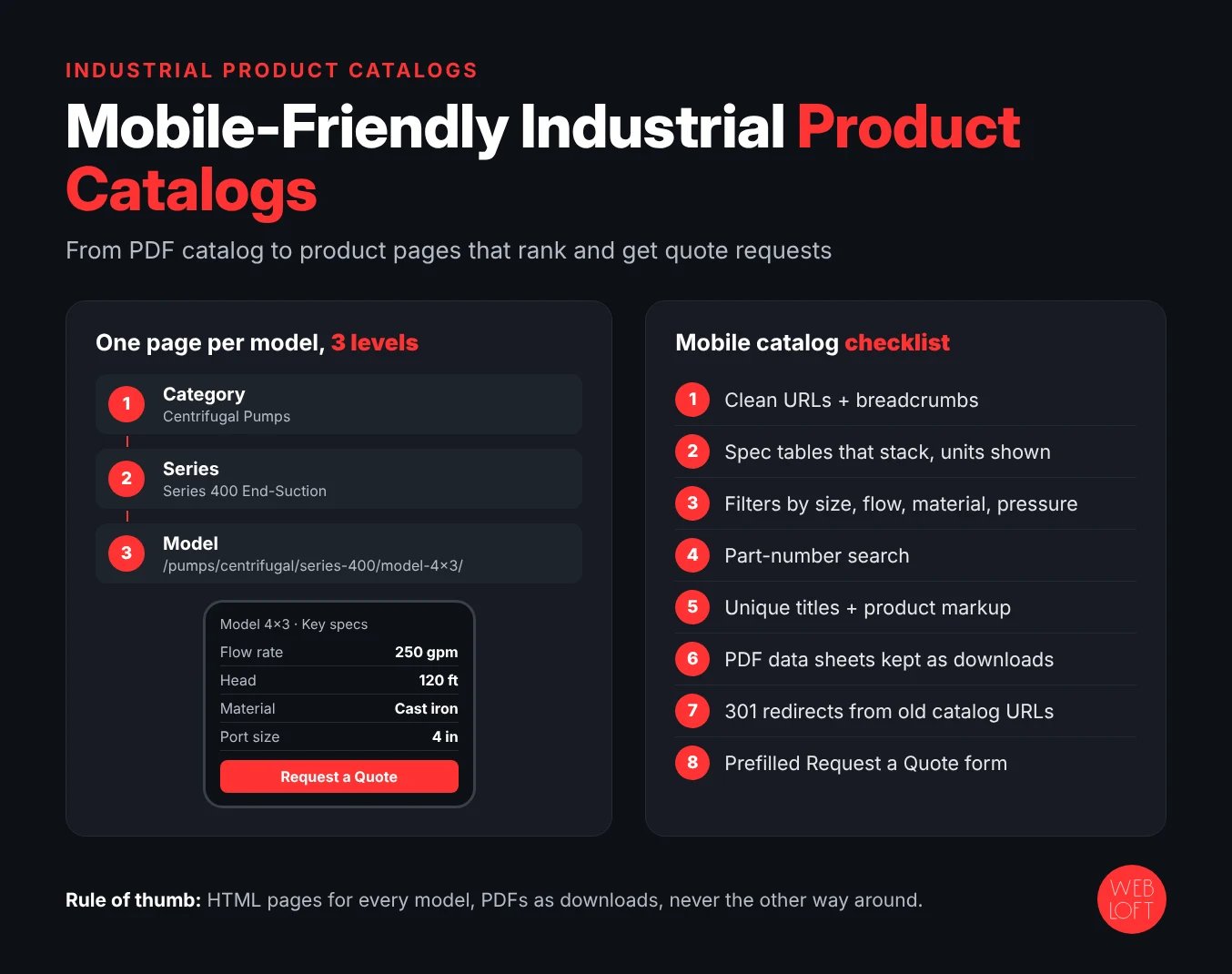
- Use three levels (category, series, model), each with its own page, clean URL and breadcrumb trail.
- Stack spec rows on mobile with key specs first, units always shown and a sticky header.
- Build filters around size, flow rate, material and pressure rating, with match counts and shareable filter URLs.
- Keep PDF data sheets live as downloads next to the new HTML pages, and redirect every old catalog URL.
Table of Contents
- Why PDF-Only Catalogs Fail on Phones and in Search
- Build the Category, Series and Model Page Structure
- Product Specification Tables for Mobile Screens
- B2B Product Catalog Search and Filtering by Spec
- Product Page SEO: Titles, Schema and Images
- Catalog PDF to HTML Migration Without Losing Rankings
- Industrial Website RFQ Forms That Prefill the Model
- Mobile Catalog Checklist
- Frequently Asked Questions
Engineers and buyers now check specs on their phones, on the plant floor, in a job trailer or between meetings. If your catalog lives in a PDF or on desktop-only pages, those buyers pinch, zoom and leave. This guide walks through how to turn a print catalog into mobile-friendly product pages that rank in search and generate quote requests.
Why PDF-Only Catalogs Fail on Phones and in Search
A PDF catalog fails on phones because it doesn’t reflow. A buyer has to zoom and scroll sideways through a page laid out for print, often after waiting for a large file to download over a weak signal.
It also underperforms in search. Search engines can index PDFs, but a 200-page catalog is one document with one title, not 200 product pages that can each rank for a model number or spec. Internal links, breadcrumbs and product details that help pages rank are missing.
The bigger loss is the quote path. A PDF has no Request a Quote button, no form and no way to capture which model the buyer was reading.
Watch Out: A single, very large PDF catalog linked from the navigation is one of the most common setups on industrial sites. It looks complete on a desktop and is close to unusable on a phone.
Build the Category, Series and Model Page Structure
The structure that works is three levels: category, series, then model. Each level gets its own page, its own URL and its own breadcrumb trail.
|
Level |
Example |
What It Lists |
|---|---|---|
|
Category page |
Centrifugal Pumps, Ball Valves |
Every series in the category |
|
Series page |
Series 400 End-Suction Pumps |
Every model, with a short spec summary |
|
Model page |
/pumps/centrifugal/series-400/model-4×3/ |
Full specs, drawings, downloads and the quote button |
Clean URLs matter. /pumps/centrifugal/series-400/model-4x3/ tells a buyer and a search engine exactly where they are. Random query strings don’t.
Breadcrumbs give the same clarity. A buyer can jump back to the series without hitting the back button four times, and search engines get a clear hierarchy.
Product Specification Tables for Mobile Screens
Spec tables that work on a phone stack into rows instead of scrolling sideways.
- Key specs first: for a pump, that’s flow rate, head, material and port size. These are the numbers a buyer checks before anything else.
- Stacked rows: each spec becomes a label and a value on its own line. No horizontal scroll.
- Units always shown: gpm, psi, °F, inches. Never leave a bare number.
- Sticky header: on long tables, keep the model name visible as the buyer scrolls.
Units are where many tables fail. A spec table that drops units forces the buyer to guess, and a guessing buyer calls a competitor instead.
How the Stacked Layout Works
On a phone, a traditional multi-column spec table either shrinks to unreadable type or forces a sideways scroll. A simple fix is to mark each spec up as a description list, with the label in <dt> and the value in <dd>. Screen readers announce the pair together, and the same markup stacks cleanly on small screens.
Handling Specs That Don’t Fit a Simple Grid
Industrial catalogs aren’t all label-and-number. Three cases need their own treatment:
- Performance curves: a pump or fan curve is a chart, not a table cell. Use a lightweight SVG so it stays sharp when zoomed, and put the key data points in a small table beneath it, so a buyer who needs the value at 60 gpm doesn’t have to read it off the chart.
- Multi-model comparisons: when a series page compares four models side by side, let mobile buyers pick two to compare instead of shrinking four columns. Two fit on a phone. Four don’t.
- Long material and compliance lists: certifications, temperature ranges and material options can run to dozens of rows. Collapse secondary specs behind a “Show all specifications” toggle so the key specs stay at the top.
Units, Precision and the Imperial/Metric Question
Most U.S. industrial buyers work in imperial units, but export customers and some engineering teams work in metric. Show the primary unit prominently with the converted value beside it, or offer a unit toggle that remembers the buyer’s choice.
Watch Out: Rounding is where spec tables lose trust. A flow rate shown as “120 gpm” when the data sheet says 118.5 gpm will get flagged by an engineer. Match the data sheet exactly.
Test the Table on a Real Phone
Load the page on an actual phone at about 360 pixels wide and check three things: no horizontal scroll, every unit visible, and the sticky header not covering the first row. Then run it through a screen reader once. If a listener can’t hear the label and value together, the table isn’t done.
B2B Product Catalog Search and Filtering by Spec
Spec filtering lets buyers narrow the list by the numbers that matter: size, flow rate, material and pressure rating. An engineer who can filter to three matching models in ten seconds doesn’t open a PDF.
Two Search Modes, Not One
Industrial buyers arrive in two modes. Searchers already have a part number and want that exact model. Browsers know they need, say, a 2-inch stainless ball valve and want to filter down to the options.
A single search box that tries to serve both usually serves neither well. The pattern that works is a search bar that recognizes part numbers and jumps straight to the model page, plus a separate filter panel for browsing.
Filters That Match How Engineers Specify
Build filters from the data sheet fields, not from marketing vocabulary. For a centrifugal pump, that usually means flow rate, head, port size, casing material, seal type and motor horsepower. For a fan, it means airflow in cfm, static pressure, drive type and wheel diameter.
Three mechanics make spec filters usable on a phone:
- Range sliders with typed input: a buyer who needs 40 to 60 gpm should be able to type those numbers, not drag a slider until it looks right.
- Multi-select with counts: show how many models match each option, so buyers don’t chase a filter that returns nothing.
- Shareable filter URLs: when a buyer filters to stainless, 2-inch, 150 psi, the URL should reflect it. They can bookmark it, send it to a colleague or pass it to purchasing.
Watch Out: A filter panel that covers the whole screen on mobile with no obvious close or “show results” button traps the buyer.
Part Numbers, Substitutions and Obsolete Models
Buyers often need a substitute because the original model is obsolete, backordered or being replaced on a project. Add a cross-reference field to each model page that lists the models it replaces. When a buyer searches a discontinued part number, show the replacement and the specs that changed. A dead-end search becomes a quote request.
Bulk and Repeat Buying
Professional buyers rarely quote one item at a time. They build a list across a project, with many line items and mixed models. A simple “add to quote list” feature lets them collect models while browsing and send one RFQ for the whole list.
If you are weighing how far to take ordering and quoting online, our guide to B2B ecommerce platforms compares the main options.
Product Page SEO: Titles, Schema and Images
Each model page is a chance to rank for the model number and the specs buyers search. Three things make that happen:
- Unique titles and meta descriptions: lead with the model and its key spec, for example “Series 400 4×3 End-Suction Pump, 250 gpm, Cast Iron.” Avoid one template title repeated across hundreds of models.
- Product structured data: add product markup with the name, model number, image, description and brand, so search engines understand the page as a product.
- Lightweight, described images: compress product photos, serve modern formats, and give every image alt text that names the model and what it shows. Offer CAD files and drawings as clearly labeled downloads instead of loading them on the page.
Page speed matters as much as layout on a phone. If your current site is slow, our guide to improving site speed without changing hosting shows which fixes to make first.
Catalog PDF to HTML Migration Without Losing Rankings
Migrating without losing rankings comes down to redirects. Every old catalog URL needs a mapped destination before you switch.
- Export every URL from the old site, plus every PDF that gets linked to or found in search.
- Map each old page to its closest new category, series or model page.
- Set a permanent (301) redirect for each old URL.
- Test every redirect on staging before launch, not after.
Keep PDF data sheets live at their existing addresses as downloads, and link to them from the matching model pages. People and sites that link to those files will still reach them. Only redirect PDFs you retire, and send them to the matching model page.
We cover the mapping work in detail in our website migration checklist, with a real example.
Industrial Website RFQ Forms That Prefill the Model
Every model page needs a Request a Quote button that opens a short form with the model number, series and key specs already filled in.
Keep the form short:
- Model number (prefilled)
- Quantity
- Needed-by date
- Application notes (optional)
Then connect the form to your CRM so each lead arrives with its source page and model attached. Our walkthrough on how to integrate CRM with website forms covers field mapping and testing step by step. For more on turning those inquiries into qualified leads, see our guide to manufacturing lead generation.
Watch Out: A quote form with a dozen required fields will lose the buyer who is standing in a plant aisle with a phone in one hand.
Mobile Catalog Checklist
Before you launch, confirm that:
- Every model has its own page and clean URL
- Breadcrumbs appear on every category, series and model page
- Spec tables stack on a phone, with units shown and key specs first
- Filters cover the specs engineers use, with counts and shareable URLs
- Part-number search jumps straight to the model page
- Each model page has a unique title, meta description and product markup
- PDF data sheets stay available as downloads
- Every old catalog URL redirects to its closest new page
- Every model page has a prefilled Request a Quote button
Plan Your Catalog Rebuild With Web Loft Designs
A catalog rebuild is a content and data project as much as a design project. Get the structure, specs and quote path right, and the pages do the selling.
Web Loft Designs plans and builds structured product catalogs as part of our website design and development work, and we can connect them to your quoting and CRM tools through custom web application development. See our case studies, then Get a Free Quote.
Frequently Asked Questions
Should industrial product catalogs be PDFs or HTML pages?
Both, with different jobs. HTML product pages carry the searchable, linkable, mobile-friendly version of each model: specs, filters, images and a quote button. The PDF stays as a downloadable data sheet for engineers who need to file it, print it or attach it to a project package. Leading with the PDF and treating HTML as an afterthought is the mistake.
How do you make an industrial product catalog mobile-friendly?
Start with structure, not styling. Split the catalog into category, series and model pages with clean URLs. Rebuild spec tables so key values stack in a single column with units attached. Then add spec-based filtering, lightweight images and a Request a Quote button on every model page with the model number prefilled.
What specifications should appear first on a mobile product page?
Lead with the three or four values an engineer checks first for that product type, such as flow rate or airflow, size or port diameter, material, and pressure or temperature rating. Put those in the first visible block with units, and let the full specification table expand below.
How do you redirect old catalog URLs without losing search visibility?
Map every old URL to its closest new page before launch and apply permanent (301) redirects. Retired models should redirect to their replacement or series page, not the homepage. Keep the redirect map in a spreadsheet, test it on staging, and check Google Search Console for 404 errors in the first month after launch.
Do product pages need structured data?
It helps. Product markup tells search engines the page describes a specific product, with its name, model number, image and brand. It doesn't guarantee rich results, but it makes your catalog easier for search engines to understand and display.