Key takeaways
- Internal links are how Google finds most of the pages on your site and how it judges which of them matter. A page with no links pointing to it is easy for Google to overlook.
- Google’s own guidance is that every page you care about should have a link from at least one other page on your site.
- The most useful internal links sit inside related content, use descriptive anchor text, and come from pages Google has already indexed.
- Links only count if Google can crawl them. That means a standard HTML link with an
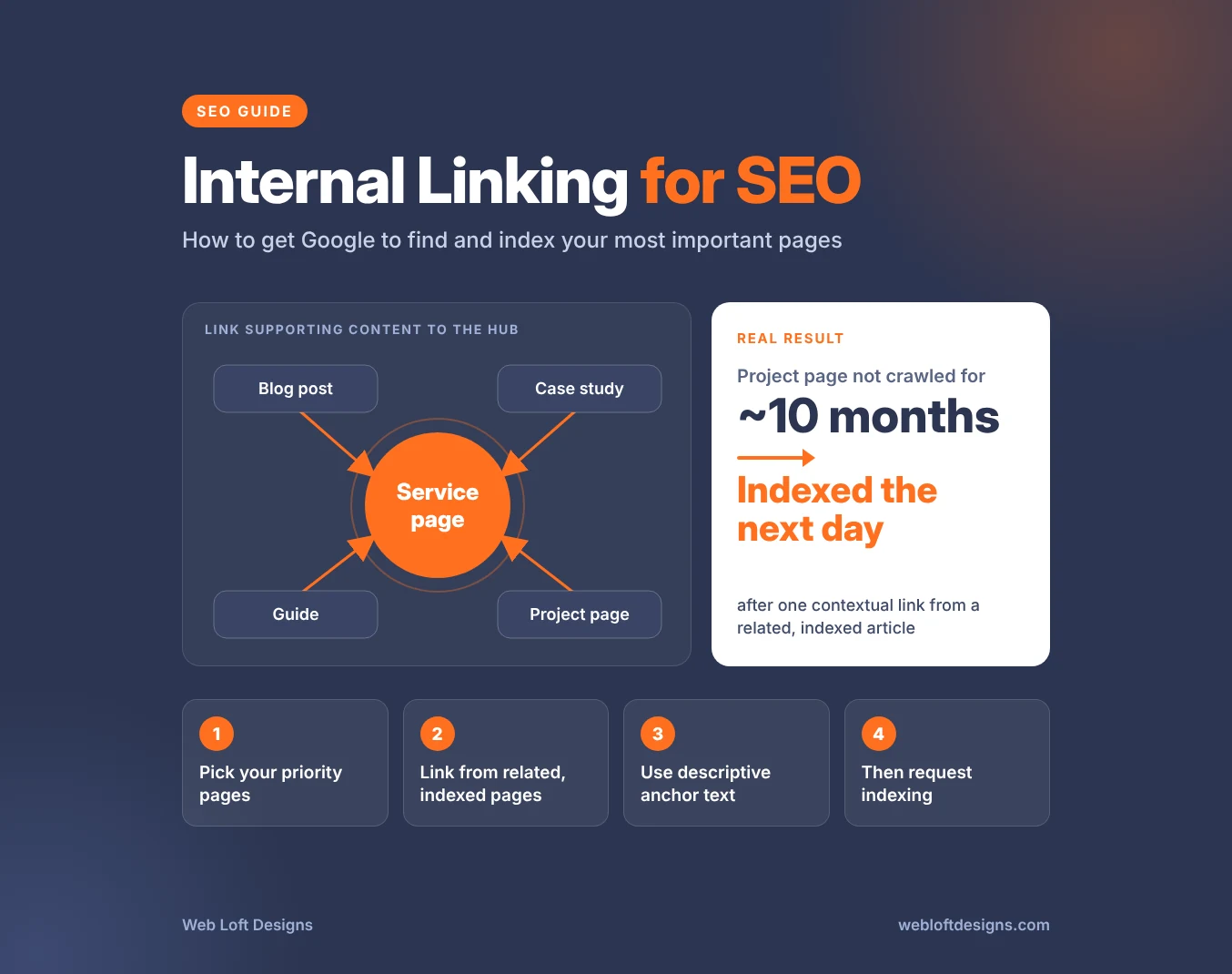
href, not a button or script that only works when clicked. - On one business website we worked on, a project page that Google hadn’t crawled in about ten months was indexed the day after we linked to it from a related, indexed article.
Most business owners think about links as something other websites give you. But the links between your own pages do a lot of quiet work. They decide which pages Google finds, how often it comes back to them, and which ones it treats as important.
When that structure is weak, good pages get stranded. Service pages sit several clicks deep, case studies are linked from nowhere but a portfolio grid, and new articles go live without a single link pointing to them. Google may know these pages exist and still decide they aren’t worth crawling or indexing.
This guide explains how internal linking affects crawling and indexing, how to decide which pages need links most, and how to add links that actually help. It finishes with what we learned from fixing internal links on a real business website.
What internal linking does for SEO
An internal link is any link from one page on your website to another page on the same website. Your main menu, footer, breadcrumbs, blog sidebars and the links inside your page copy are all internal links.
Google describes links as a signal it uses to judge how relevant pages are and to find new pages to crawl (Google Search Central). For your own site, that means internal links do three jobs:
- Discovery. Google follows links from pages it already knows to pages it doesn’t. A page that nothing links to, often called an orphan page, depends almost entirely on your sitemap to be found.
- Priority. Pages that many relevant pages link to look more important than pages buried at the edge of the site. Google tends to crawl well-linked pages more often.
- Context. The anchor text and the sentence around a link tell Google what the linked page is about before it even visits it.
Google is direct about the minimum: every page you care about should have a link from at least one other page on your site. Most important pages deserve far more than one.
Signs your important pages need more internal links
Weak internal linking rarely shows up as an error. It shows up as pages that underperform for no obvious reason. Look for these patterns in Google Search Console:
| What you see | What it often means |
|---|---|
| Pages listed as “Discovered – currently not indexed” | Google knows the URL but hasn’t prioritized crawling it. Stronger internal links are usually the first fix. |
| Pages listed as “Crawled – currently not indexed” with a last crawl date months ago | Google looked once, passed, and hasn’t returned. A new link from a relevant indexed page gives it a reason to look again. |
| Key service pages near the bottom of the Links report’s “Top linked pages” | Your site is sending more internal links to less important pages than to the ones that bring in business. |
| New blog posts that take weeks to appear in search | The post was published without links from older, indexed content. |
| Case studies or project pages that are never indexed | They are only reachable through a portfolio grid or a repeated template block, not from related content. |
If you are working through a list of non-indexed pages, our guide to why Google isn’t indexing your pages and how to fix it explains each status and which pages should stay out of search on purpose.
Decide which pages matter most
Internal linking works best when it is aimed. Before adding links, list the pages you most want Google to find, index and rank. For most business websites, that list looks like this:
- Service pages. These are the pages that turn searches into inquiries. They should receive the most internal links on the site.
- Location or industry pages, if you serve specific cities or sectors.
- Case studies and project pages. They prove you can do the work, and they are often the most neglected pages on the site.
- Cornerstone guides that answer the main questions your customers ask before they buy.
Pages that should not be in search at all, such as tag archives, thank-you pages and form confirmations, don’t belong on this list. Linking heavily to them sends Google’s attention in the wrong direction.
How to build internal links that help indexing
1. Check how each priority page is linked today
In Search Console, open the Links report and look at internal links for each priority page. A crawl of your site gives the same picture in more detail, including pages with no internal links at all. Note which pages have only menu or footer links and nothing from within your content.
2. Find related pages Google has already indexed
The best source for a new link is a page that is already indexed and closely related to the page you want to support. Search Google for site:yourdomain.com plus the topic, for example site:yourdomain.com "restaurant website", to find your own pages that cover it. Confirm the source page is indexed with the URL Inspection tool.
A link from an indexed page gives Google a path it is likely to follow soon. A link from another page that Google is ignoring does much less.
3. Add the link inside the content, with context
A link in the body of a relevant page carries more meaning than a link in a sidebar or footer. Don’t just drop a link into an existing sentence. Write one or two sentences that explain why the linked page is relevant to the reader at that point.
For a project page, that might be a short paragraph describing what was built for the client, using only facts from the project page itself. For a service page, it might be the moment in a guide where the reader realizes they need help.
4. Write descriptive anchor text
Anchor text is the clickable text of a link. Google’s guidance is that it should be descriptive, reasonably concise and relevant to both pages. A useful test: read only the anchor text, out of context. If you can’t tell what the linked page is about, it needs more description.
| Weak anchor text | Stronger anchor text |
|---|---|
| Click here | our ongoing SEO packages |
| Read more | how we rebuilt a restaurant group’s online ordering |
| this article | a guide to planning site structure for SEO |
Vary your anchors naturally. Using the exact same keyword phrase in every link to a page reads awkwardly and adds nothing.
5. Link supporting content up to your service pages
Think of each service page as the hub for its topic. Every blog post, case study and FAQ about that topic should link to it, and the service page should link back out to the strongest supporting pages. This keeps related pages close together and makes the service page the obvious destination for the topic.
It is much easier to plan this structure before a site is built than to retrofit it later. Our guide to designing a website for SEO covers site structure from the start, and our website redesign strategy guide covers keeping internal links intact when URLs change.
6. Then request indexing
Once the new links are live, use URL Inspection to request indexing for the page that received them. Google notes that a recrawl request makes sense after you have made a meaningful change (Google Search Central). A new link from an indexed, related page is that kind of change. Requesting indexing for a page that nothing has changed on rarely moves it.
Make sure Google can actually follow your links
A link only helps if Google can crawl it. Google says it can generally only crawl a link if it is an HTML <a> element with an href attribute. Links built other ways may look fine to visitors and still be invisible to crawlers.
| Google can follow | Google may not follow |
|---|---|
<a href="/services/seo/">SEO services</a> |
<a onclick="goto('/services/seo/')"> |
A link added by JavaScript that still outputs a normal <a href> |
A <div> or <span> styled to look like a link |
| An image link with descriptive alt text | <a href="javascript:..."> |
Page builders, sliders and card grids are common places for this to go wrong. To check a page, open it in your browser, view the page source and search for the URL you expect it to link to. If it isn’t there as an href, ask your developer to change how the link is built.
Common internal linking mistakes
- Repeating the same long list of links on every page. A “related projects” or “featured work” block that lists dozens of pages on every template page makes those pages look alike and spreads attention thinly. A few hand-picked, relevant links are worth more.
- Relying on the menu and footer. Navigation links help, but they appear on every page and say little about how pages relate. Important pages also need links from within related content.
- Publishing without linking. Every new post or page should get at least one link from an existing indexed page on publish day, and should link out to the relevant service page.
- Linking to redirected or noindexed URLs. After a redesign or cleanup, update links to point directly at the final URL instead of sending Google through redirects or to pages you have removed from search.
- Using nofollow on internal links. There is rarely a reason to hold back your own pages from Google. If a page shouldn’t be in search, use noindex on that page instead.
- Chaining links together. Several links in a row with no text between them are hard for readers to tell apart and give Google little context for each one.
Google doesn’t set a magic number of links per page. Its guidance is simply that if a page feels like it has too many, it probably does.
What internal links did for one business website
We recently worked through an indexing cleanup on a business website with service pages, blog posts and a large portfolio of project pages. After removing pages that shouldn’t be in search and improving thin content, most of the pages still left out of the index were project pages. Many hadn’t been crawled in months.
Requesting indexing on those unchanged pages was unlikely to help, so we gave Google a reason to look again. For each project page, we found an indexed blog post on a closely related topic and added a short paragraph describing what was built for that client, with a descriptive link to the project page. Only after the link was live did we request indexing.
Three results stood out:
- A project page Google had not crawled in about ten months was indexed the next day. The link came from a newly rewritten, indexed article where the project was a natural example.
- Blog posts that received new links from related, indexed articles were also indexed in the same reporting window, alongside the posts we had rewritten.
- The biggest problem was a template, not a page. Every project page carried the same block of links to more than 150 other projects. That made every page in the section look nearly identical and gave no single project any priority. Removing that block is a template change that improves every project page at once, which is why we treated it as its own fix rather than adding more links on top of it.
The lesson for most business websites is simple. Internal links work best when they are few, relevant and written for the reader. Lists of links repeated on every page don’t do the same job.
Internal linking checklist
- List your most important pages: services, locations or industries, case studies and cornerstone guides.
- Check each one in the Links report and note pages with few or no links from content.
- Find related pages that are already indexed and link from them in context.
- Use descriptive anchor text that makes sense on its own.
- Link every supporting post and case study to its service page.
- Confirm important links are real
<a href>links in the page source. - Replace long, repeated link blocks with a few relevant links.
- Update links that point to redirected or noindexed URLs.
- Give every new page at least one link from an indexed page on the day it goes live.
- Request indexing only after the new links are live.
Frequently asked questions
Does internal linking help a page get indexed?
Yes. Google uses links to discover pages and to judge their relevance. A contextual link from a related page that is already indexed is one of the most reliable ways to get an overlooked page crawled again and reconsidered for the index. It doesn’t guarantee indexing if the page itself is thin or duplicated.
How many internal links should a page have?
There is no ideal number. Link where it genuinely helps the reader understand the topic or take the next step. Every important page should receive links from several related pages, and a typical article can link to a handful of relevant pages without feeling crowded.
Do menu and footer links count as internal links?
Yes, Google can follow them. But because they appear on every page, they say little about how pages relate to each other. Your most important pages also need links from within related content.
Should I use the same anchor text every time I link to a page?
No. Use descriptive anchor text that fits each sentence. Slight variation is natural and reads better than repeating one keyword phrase across the site.
How long does it take for a new internal link to work?
It depends on how often Google crawls the page that holds the link. In our cleanup, a project page was indexed the day after it received a link from an indexed article and an indexing request. Other pages can take days or weeks, and requesting indexing after adding the link usually speeds things up.
Need help with internal linking and indexing?
Internal linking is part of every engagement in our SEO packages, alongside Search Console and indexing management. If you are not sure why important pages aren’t showing up in search, start with a free technical SEO audit and we will show you which pages need attention first.