ChatGPT has become a place where people research products, compare options and decide who to buy from. Until recently, businesses had no direct say in how they showed up there. That changed on November 10, 2026, when OpenAI launched Businesses in ChatGPT in beta.
If you’ve managed a Google Business Profile, the idea will feel familiar: you claim your business, verify that you’re authorized to represent it, keep your details accurate, and get data on how people find you. This guide covers what the new program includes, who can use it, how to claim your business step by step, and what it means for e-commerce stores and local service businesses.
What Is Businesses in ChatGPT?
Businesses in ChatGPT is OpenAI’s new program for companies that want to manage their presence inside ChatGPT. It has three parts:
- Business Hub: the dashboard where you claim your business, update your details and add product information.
- Insights: aggregated data on how often ChatGPT mentions your business, how many people click through to your website, and the topics behind those mentions.
- Business Agents: an AI agent that answers customer questions about your products and services, currently available to a narrower group of businesses.
The program is still in beta, so features, eligibility rules, and availability may change as OpenAI expands it.
What You Get When You Claim Your Business
A verified business profile
Once your claim and identity verification are approved, you can update the details ChatGPT shows about your business. According to OpenAI’s help center, that includes your website, business description, product or service category, logo, delivery policy and return policy.
OpenAI reviews changes before publishing them, and updates can take time to appear. ChatGPT may also keep using other sources when it answers questions about your business, which is why the information on your website and other listings still matters.
Product feeds
If you sell products, you can connect a product feed to share current prices and availability. Shopify stores can connect directly, and other stores can upload a CSV file or link to a hosted feed that follows OpenAI’s product feed specification. OpenAI also notes that eligible Shopify products are already included in ChatGPT through Shopify Catalog.
Keep in mind that connecting a feed doesn’t guarantee ChatGPT will recommend your products. It gives ChatGPT accurate, current data to work with.
Insights
Business Hub shows three metrics for the past 28 days:
- Mentions: how often your business appears in ChatGPT responses.
- Website clicks: how many times people clicked a link to your site.
- Discovery topics: common themes in the conversations where your website appears.
Business Agents (for eligible businesses)
A Business Agent is an AI assistant built on the information you provide. When your business appears in a ChatGPT answer, a user can open your profile and start a separate, clearly labeled conversation with your agent to ask about products, policies or differences between options. For now, Business Agents are limited to eligible e-commerce and online service businesses in the United States.
Who Can Claim a Business in ChatGPT?
Eligible businesses located where ChatGPT is available can claim their profile through Business Hub. OpenAI says availability depends on the business’s location and type, and on the verification methods supported for it.
Business Agents have stricter rules. A business must meet OpenAI’s requirements for location, business type and industry, and some businesses can manage a profile without being eligible for an agent. Verifying your business doesn’t automatically qualify you for one.
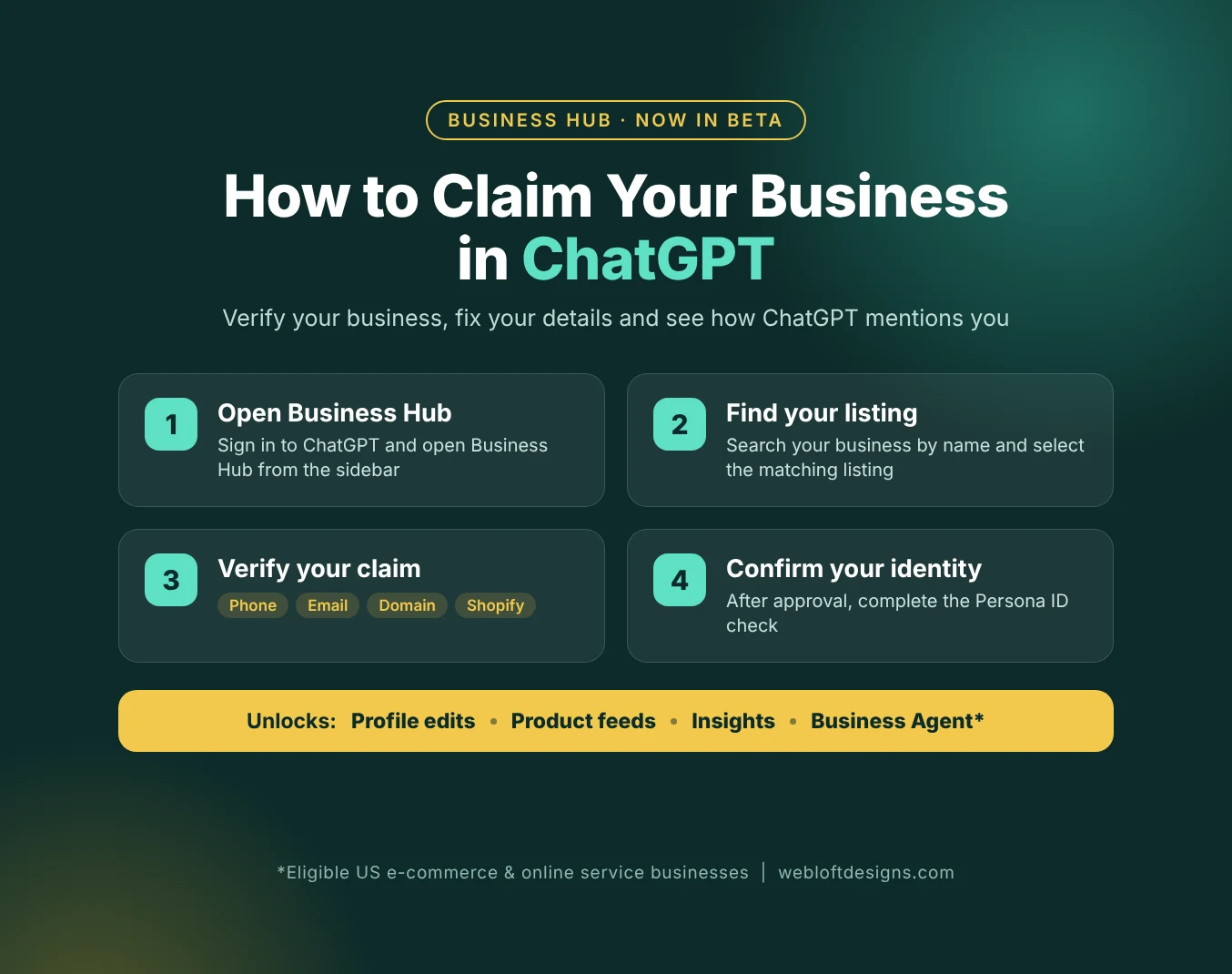
How to Claim Your Business in ChatGPT: Step by Step
The process takes a few minutes to start, plus review time from OpenAI.
- Sign in to ChatGPT with the account you want to manage the business from. Use an account your company controls long term, not a personal or temporary one.
- Open Business Hub from the ChatGPT sidebar, or go to chatgpt.com/business-hub.
- Search for your business by name and select the listing that matches it.
- Confirm the account you’ll use to manage the business.
- Verify your claim with one of the methods offered for your business:
- Business phone: receive a code by text message or automated call.
- Business email: receive a code at your business email address.
- Website domain: add the TXT record shown in ChatGPT to your domain’s DNS settings, then select “Verify domain.”
- Shopify: connect your Shopify store.
- Wait for approval. OpenAI reviews the claim before you get access to your business in Business Hub.
- Complete identity verification with Persona. This step is required before you can publish changes to your business information, connect a product feed, view insights or create a Business Agent.
- Update your profile and, if you sell products, connect your product feed.
A practical tip for the domain method: if someone else manages your DNS (your web developer, hosting provider or IT team), loop them in before you start. DNS changes can take time to update, so you may need to wait before selecting “Verify domain.”
What the Insights Show and What They Don’t
For the first time, businesses get first-party data from ChatGPT itself, which makes Business Hub a useful addition to your reporting. But it’s important to understand its limits:
- Data is aggregated. Businesses don’t see individual user conversations or Business Agent chats.
- Data appears only above certain thresholds. Smaller businesses may see little or no data at first, and a blank metric doesn’t necessarily mean zero activity.
- It covers ChatGPT only. It won’t tell you how you appear in Google’s AI Overviews, Gemini, Perplexity or other AI tools.
Treat these numbers as one signal alongside your Google Search Console, analytics and AI visibility tracking, not as a replacement for them.
What This Means for E-commerce Stores
Online stores have the most to gain from this launch right now. A verified profile, an up-to-date product feed and, for eligible US stores, a Business Agent give you more control over how your products are described when shoppers research in ChatGPT.
- Shopify stores can connect directly from Business Hub or the Shopify admin, which also helps with verification.
- WooCommerce and other platforms can use a CSV or hosted product feed. If your product data is messy (missing prices, inconsistent titles, outdated stock levels), clean it up first, because the same issues will carry over into ChatGPT.
- Business Agents are only as good as the information behind them. Clear product descriptions, shipping and return policies, and FAQs on your website give your agent better material to work with.
Businesses can also sponsor their Business Agent and use it as the destination for ChatGPT Ads. Sponsored placements are labeled and kept separate from ChatGPT’s regular responses.
What This Means for Local Service Businesses
If you run a contractor, landscaping, home service, or professional services business, Business Agents aren’t available to you yet. Claiming your profile is still worthwhile:
- You secure your business name and listing before anyone else claims it.
- You can correct your website, description, and category if ChatGPT has them wrong.
- You’ll be ready to use new features as OpenAI expands the program to more business categories.
Think of it the same way you think about your Google Business Profile: a listing you claim, keep accurate and check regularly.
Does Claiming Your Business Guarantee ChatGPT Will Recommend You?
No. Claiming your business and connecting a product feed give ChatGPT accurate information, but they don’t guarantee placement in its answers. ChatGPT also draws on other sources, which means the fundamentals still decide how often you get recommended:
- A fast, crawlable website with clear service and product pages
- Consistent business information across your website, Google Business Profile and directory listings
- Structured data (schema markup) that helps AI systems understand your business
- Reviews and mentions on trusted third-party sites
- Content that directly answers the questions your customers ask
Business Hub gives you a seat at the table. A strong SEO and AEO (Answer Engine Optimization) foundation is what gets you recommended.
Quick Checklist: Getting Your Business Ready for ChatGPT
- Choose a company-owned ChatGPT account to manage your business
- Claim your business in Business Hub and complete Persona verification
- Update your website, description, category, logo and policies
- Connect a product feed if you sell products online
- Check whether your business is eligible for a Business Agent
- Make sure your website and Google Business Profile match your ChatGPT profile
- Review your Insights regularly once data becomes available
Frequently Asked Questions
What is ChatGPT Business Hub?
Business Hub is the dashboard where businesses claim their profile in ChatGPT, update their information, connect product feeds, view insights and, if eligible, create a Business Agent. You can open it from the ChatGPT sidebar or at chatgpt.com/business-hub.
How do I verify my business in ChatGPT?
After finding your listing in Business Hub, you verify your claim with one of the methods offered for your business: business phone, business email, a DNS TXT record on your website domain, or a Shopify connection. After OpenAI approves the claim, you complete identity verification with Persona.
Can any business create a Business Agent?
No. Business Agents are currently available to eligible e-commerce and online service businesses in the United States. Business type and industry also affect eligibility, and verifying your business alone doesn’t guarantee access to an agent.
Can businesses see what users ask ChatGPT?
No. Insights are aggregated, and businesses don’t receive individual users’ ChatGPT conversations or Business Agent chats.
Do I still need SEO if I claim my business in ChatGPT?
Yes. ChatGPT uses other sources besides your Business Hub profile, so your website, listings, reviews and content still shape whether and how you’re recommended.
Need Help Getting Your Business Ready for AI Search?
Claiming your profile takes a few minutes. Making sure ChatGPT and other AI tools understand, trust and recommend your business takes a solid foundation. At Web Loft Designs, our SEO plans cover the technical SEO, content, structured data and listing work that helps your business show up in both traditional search and AI answers. Request a free technical SEO audit to see where your website stands.
Sources: OpenAI, “Introducing Businesses in ChatGPT”; OpenAI Help Center, “Setting up your business on ChatGPT”.