


Table of Contents
- Step 1: Run a Website Audit Before You Change Anything
- Step 2: Apply B2B Web Design Best Practices to Build Trust Fast
- Step 3: Build a Keyword Strategy Around Search Intent
- Step 4: Conversion Rate Optimization for Service Firms
- Step 5: Local SEO for Service Businesses
- Step 6: Study Professional Services Website Examples That Actually Convert
- Step 7: Fix Accessibility and Post-Click Experience Before You Scale
- Common Mistakes to Avoid When You Optimize Website Performance
- Frequently Asked Questions
Last Updated: September 27, 2026
Step 1: Run a Website Audit Before You Change Anything
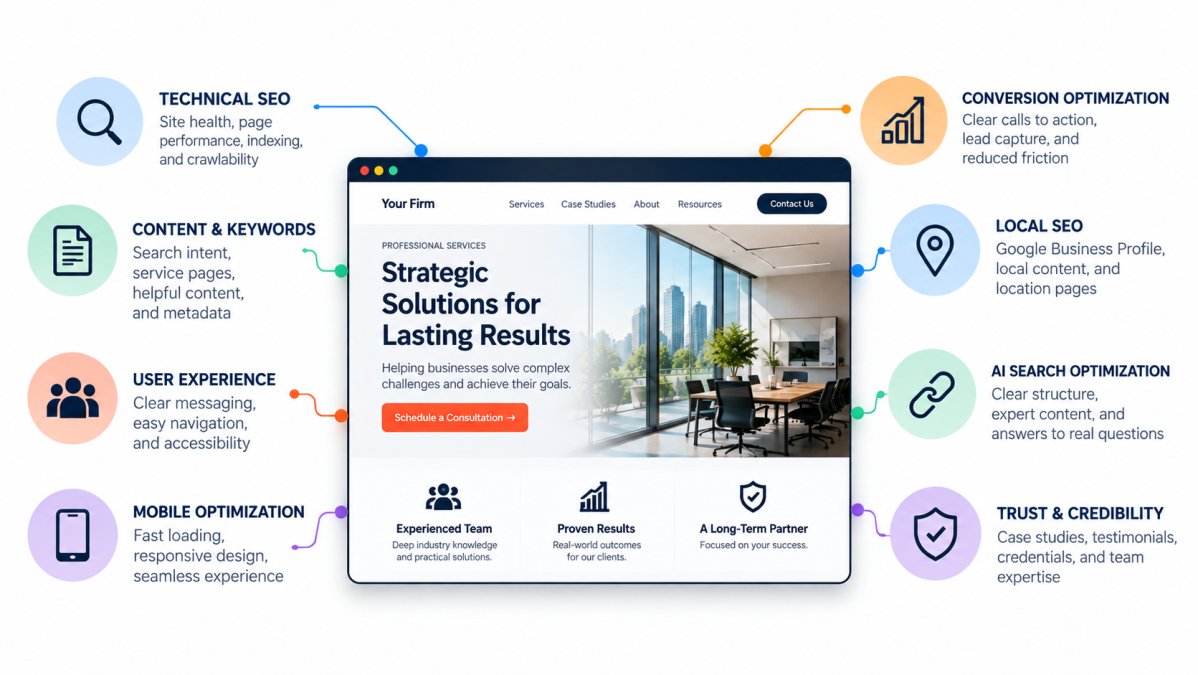
Before changing a website, understand what is actually working, what isn’t, and where visitors are getting stuck. A proper website audit should look beyond design and include technical performance, search visibility, analytics, content, user experience, conversion paths, and the customer journey.
At Web Loft Designs, we don’t start with the assumption that a website needs to be completely redesigned. Sometimes the biggest opportunities are structural, technical, or content-related and can be addressed without rebuilding everything.
Start by reviewing:
- Technical health and crawlability
- Mobile and desktop performance
- Analytics and conversion tracking
- Forms, calls, bookings, and other conversion points
- Navigation and site architecture
- Key landing and service pages
- Search visibility and traffic sources
- Where visitors enter, where they leave, and what they do in between
What to Check in Your Technical SEO Audit
Technical SEO covers everything search engines crawl but visitors never see. Get it wrong and nothing else matters.
Check these first:
- Page performance. Test real-world mobile and desktop performance, including Core Web Vitals. Don’t focus on a single load-time number; identify the images, scripts, fonts, plugins, third-party tools, or code that are creating unnecessary delays.
- Indexing. Confirm Google can crawl every service page. Blocked pages earn zero traffic.
- Metadata. Every page needs a unique title and description.
- Structured data. Use relevant schema markup where appropriate to help search engines better understand your business, services, organization, content, and other important entities.
- Mobile optimization. Test on a real phone, not a browser resize.
Establish Your Own Performance Baseline
Industry averages can provide context, but your own website data is much more useful. A professional-services website receiving mostly branded referral traffic may behave very differently from one attracting visitors through informational search, paid advertising, or local SEO.
Before making major changes, establish a baseline so you can measure whether the work actually improves business results.
Track:
- Qualified leads by source
- Form submissions and completion rate
- Calls and booked consultations
- Conversion rate by important landing page
- Organic search clicks and impressions
- Engagement on priority service pages
- Lead-to-qualified-opportunity rate when CRM data is available
Don’t measure success by traffic alone. More visitors are useful only if the website is attracting the right people and helping more of them take the next meaningful step.
Step 2: Apply B2B Web Design Best Practices to Build Trust Fast
Trust is the product for professional services. Visitors decide in seconds whether your firm looks credible, before they read a word about your process. B2B web design best practices put proof front and center: clear service pages, visible credentials, fast load times. In our experience, websites are more effective when they focus on the prospective client’s needs and provide relevant proof rather than making the company’s history the primary message.
What matters most:
- Lead with outcomes, not company history
- Show real client names and logos where you can
- Make your phone number and contact form impossible to miss
- Use plain language, not industry jargon
Put Proof Where the Doubt Lives
Doubt doesn’t happen on the homepage. It happens when a visitor decides whether to fill out the form, scans your credentials, or reaches for the phone. Place proof at those exact spots:
- A named testimonial directly above or beside the contact form
- A license or certification badge next to the phone number
- A one-line result (“cut intake time in half”) under the primary call to action
Video Does What Text Can’t
Most professional services sites are wall-to-wall text, which wastes video’s ability to build trust faster than any paragraph. You don’t need a production crew. Two formats do most of the work:
- Client testimonials: 60 to 90 seconds, one client, one specific result. Real names, real faces.
- Expert explainers: A partner or senior team member answering the single question prospects ask most often before they call.
Accessibility Is a Trust Signal, Not an Afterthought
A site that’s hard to use for people with disabilities looks careless, and that perception costs you leads. Quick wins that also help search engines:
- Alt text on every meaningful image
- High color contrast on text and buttons
- Keyboard-accessible links and forms
- Clearly labeled form fields
Speed Is Part of the Design
A beautiful site that takes six seconds to load on a phone is a bounce. Test on a real phone and a real connection, not a resized desktop browser. Compress images, cut unused scripts, and check your fonts. Design decisions and speed decisions are the same decisions.
Step 3: Build a Keyword Strategy Around Search Intent
Keyword strategy starts with intent, not volume. “Commercial HVAC repair” carries buying intent; “what is HVAC” does not. Match your pages to what people actually want.
Mapping Keywords to Service Pages
One page per service, one keyword theme per page. Map it like this:
- Service pages: Target high-intent phrases tied to a specific offer
- Location pages: Target “[service] near [city]” style searches
- Blog posts: Target questions and research-stage queries
- Homepage: Target your core brand and category terms
Writing Metadata That Earns the Click
Your title tag and meta description are your ad on the results page. Write them to earn the click:
- Keep titles under 60 characters
- Put the main keyword near the front
- Write descriptions that promise a specific outcome
- Add a clear reason to click, not just a summary
Small changes here move traffic without touching your design.
Step 4: Conversion Rate Optimization for Service Firms
Conversion rate optimization for service firms means removing friction between a visitor and a booked call, less about design trends, more about clearing the path.

Start with the basics:
- One clear call to action per page
- Short forms (name, email, phone, message)
- Click-to-call buttons on mobile
- Live chat or a fast reply promise
Trust Signals and Client Testimonials That Convert
Trust signals do the selling for you. Place them where doubt creeps in: near forms, pricing, and calls to action.
Use these:
- Named client testimonials with photos
- Logos of brands you’ve worked with
- Certifications and licenses
- Case study results with real numbers
Step 5: Local SEO for Service Businesses
Local SEO for service businesses decides who shows up when someone searches for help nearby. For most firms, that’s where the money is.
Get the fundamentals right:
- Claim and fully complete your Google Business Profile
- Pick the most precise category for your firm
- Keep your name, address, and phone identical everywhere
- Collect reviews consistently and reply to every one
Step 6: Study Professional Services Website Examples That Actually Convert
The fastest way to improve is to study sites that already work. Here’s the method we use when a client asks us to benchmark their site. Pick five firms in your industry, not the biggest names, the ones that clearly get inquiries, and run the same teardown on each.
The Five-Point Teardown
For each site, answer these five questions in writing:
- What’s above the fold? A result, a testimonial, or a wall of stock photography?
- How fast does it load on a phone? Time it on your own device, not a desktop tool.
- Where is the call to action? Count how many competing buttons are on the homepage. More than one primary action is a red flag.
- What proof do they show, and where? Named clients, case study numbers, certifications, video?
- What happens after you submit the form? Submit a real inquiry and time the response. This is the step almost nobody benchmarks, and it’s the one that separates firms that convert from firms that just look good.
Patterns That Show Up Again and Again
Across strong professional services sites, the same things repeat:
- One primary path to contact. No clutter, no competing buttons. Just one obvious next step.
- Proof near the ask. Testimonials and credentials sit beside the form, not on a separate page.
- A short form. Name, email, phone, and a message box. Every extra field costs you submissions.
- A fast reply promise. “We respond within one business hour” beats “contact us” every time.
- A clear next step after submission. An instant confirmation and a booking link, not silence.
The Post-Click Test Most Firms Skip
Here’s the gap almost every competitor misses: they study the homepage and ignore what happens after the click. Submit an inquiry to each benchmark site and note:
- How fast you get a confirmation
- Whether a real person follows up, and when
- Whether you’re routed to a booking calendar or left waiting
Step 7: Fix Accessibility and Post-Click Experience Before You Scale
Accessibility and post-click experience are the two areas most firms ignore. Both cost you leads and search visibility.
Fix accessibility first:
- Add alt text to every image
- Keep color contrast high
- Make every link and button keyboard-accessible
- Label every form field clearly
WCAG Compliance as a Trust and SEO Signal
WCAG compliance is the standard for accessible web content, and it’s a trust signal and a search signal at once. Clean structure, proper headings, and clear labels help screen readers and search engines alike. Then fix the post-click path, a form submission is not the finish line.
- Send an instant confirmation email
- Route leads to a real person within minutes
- Follow up with a booking link
- Track every step in your CRM
Common Mistakes to Avoid When You Optimize Website Performance
These mistakes show up in almost every audit we run. Avoid them and you’re ahead of most firms.
- Chasing traffic before fixing conversion. More visitors to a leaky site wastes money.
- Ignoring mobile speed. Most local searches happen on phones, often on weak connections.
- Stuffing keywords. It reads badly and search engines ignore it.
- Skipping accessibility. You shut out visitors and weaken your search standing.
- No tracking. If you can’t measure it, you can’t improve it.
Frequently Asked Questions
How long does it take to see results after I optimize website performance?
Technical fixes like page speed and mobile optimization can show measurable gains in 2-4 weeks. SEO improvements that depend on indexing and authority typically take 3-6 months. The professional services average conversion rate sits at 4.6% (Wingify, 2026), so track your baseline first, then measure progress against that number rather than guessing. Firms that audit before they change anything consistently see faster, clearer results.
What are the most important conversion elements for a consulting or professional services website?
Client testimonials, clear service pages, visible contact options, and a specific call to action on every page. Trust signals matter more in professional services than in e-commerce because buyers are choosing a firm, not a product. Include named client results where you can, keep forms short, and make your phone number visible on mobile. These elements directly affect your conversion rate and lead generation volume.
How does site speed impact lead generation for professional service firms?
Page speed affects both search visibility and how long visitors stay. Slow pages raise bounce rate, and Google uses speed as a ranking factor. Systematic speed work can lead to significant performance improvements. Faster sites keep high-intent traffic on the page long enough to read your value proposition and submit a form.
Is SEO still worth it in 2026 with AI overviews and zero-click searches?
Yes, but SEO is evolving. People now discover businesses through traditional search results, maps, AI-generated answers, review platforms, social content, and other sources. That means visibility can no longer be measured only by rankings and website clicks. Strong SEO in 2026 should help search engines and AI systems understand your business, services, expertise, locations, and authority. The goal is broader discoverability across the places where prospective customers research and make decisions—not simply ranking for a list of keywords.
A professional-services website should do more than look credible. It should help the right people find your business, understand what you offer, trust your expertise, and take the next step.
At Web Loft Designs, we have been designing and developing websites since 2003. One of the biggest lessons we have learned is that the strongest websites don’t treat design, development, SEO, content, accessibility, analytics, and conversion optimization as separate projects. They work together as one system built around the customer journey and the goals of the business.
Whether you are improving an existing website or planning a new one, start by understanding where you are today, what your customers actually need, and what measurable business outcome the website needs to support.
Get a free quote from Web Loft Designs and turn your website into a lead engine.