Moving an online store to Shopify can unlock a faster, easier-to-manage storefront, but the move itself is where most stores lose traffic and sales. Product URLs change, old pages disappear, and rankings built over years can slip in a matter of weeks. Imaging Spectrum faced an even bigger version of that challenge: merging two separate websites into one while moving to Shopify Plus.
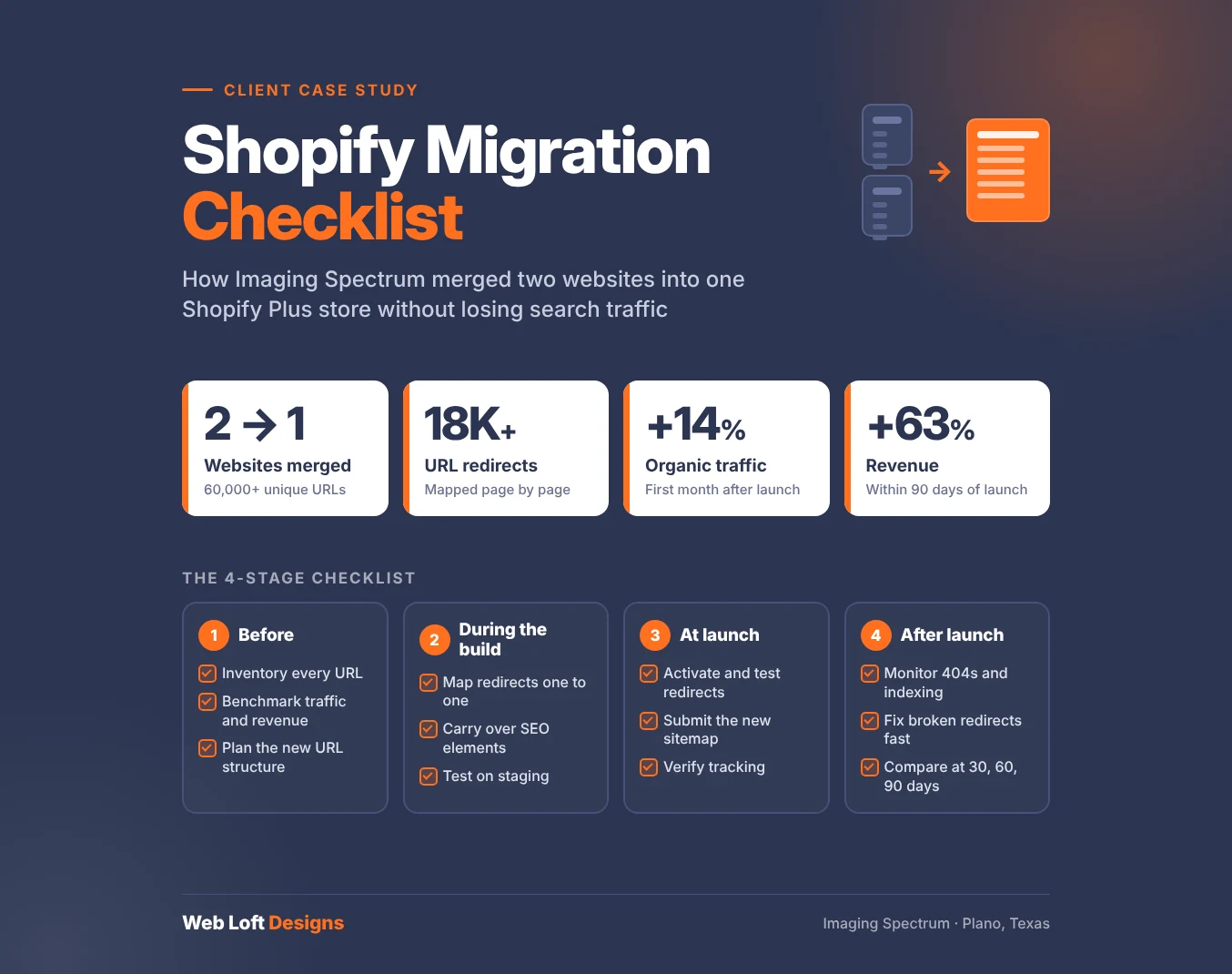
The short answer: A successful Shopify migration comes down to preparation. Inventory every URL, benchmark your current traffic, map redirects page by page, rebuild with SEO in mind and monitor closely after launch. Following that process, Imaging Spectrum consolidated two websites with more than 60,000 unique URLs, implemented 18,000+ redirects, grew organic traffic 14% in the first month and increased revenue 63% within 90 days of launch.
The Results at a Glance
|
Metric |
Result |
|---|---|
|
Websites consolidated |
2 into 1 |
|
URL redirects implemented |
18,000+ |
|
Organic traffic, first month after launch |
+14% |
|
Conversions |
+78% |
|
Revenue, within 90 days of launch |
+63% |
The Project: Two Websites, One Shopify Plus Store
Imaging Spectrum is a printing solutions provider based in Plano, Texas. The company ran two established websites, Pakor.com and ImagingSpectrum.com, serving both B2B and B2C customers. The goal was to bring everything together under the Imaging Spectrum brand on Shopify Plus and modernize an outdated design.
The stakes were high. Across both sites, the business had more than 10,000 monthly organic visitors landing on roughly 3,000 product pages. Product variations multiplied that into more than 60,000 unique URLs. Losing even part of that traffic during the move would have meant lost sales.
The Shopify Migration Checklist We Followed
Every migration is different, but these are the steps that protected Imaging Spectrum’s traffic and revenue. You can use the same checklist for your own store.
Before the Migration
- Inventory every URL. Crawl your current site and export a complete list of product, category, content and landing page URLs, including variant URLs. For Imaging Spectrum, that meant accounting for more than 60,000 URLs across two domains.
- Benchmark your performance. Record organic traffic, top landing pages, rankings, conversions and revenue before anything changes. Without a baseline, you can’t tell whether the migration helped or hurt.
- Identify your most valuable pages. Flag the pages that drive the most traffic, links and sales. These need the most careful handling.
- Plan your new URL structure. Shopify uses fixed URL patterns, such as /products/ and /collections/, so most URLs will change during a migration. Plan the new structure before you build.
- Decide how to handle domains. When merging sites, choose which domain will remain and how the other brand will be represented. Imaging Spectrum consolidated under its own brand while keeping both its B2B and B2C audiences in mind.
During the Build
- Map redirects one to one. Point every old URL to its closest equivalent on the new site, not to the homepage. Imaging Spectrum’s migration required more than 18,000 individual redirects.
- Carry over SEO elements. Migrate page titles, meta descriptions, headings, product descriptions and image alt text, so pages keep the content that helped them rank.
- Handle product variants carefully. Decide how variant URLs will be consolidated so search engines see one strong product page instead of many thin, duplicate ones.
- Design for every audience. If you serve both business and consumer buyers, build a unified experience that works for both. That was central to Imaging Spectrum’s new store.
- Test on staging. Check redirects, navigation, checkout and key pages before launch.
At Launch
- Activate and test redirects. Spot-check high-value URLs and run a crawl of old URLs to confirm they resolve correctly.
- Submit your new sitemap. Shopify generates a sitemap automatically. Submit it in Google Search Console so search engines find the new pages quickly.
- Use Google’s Change of Address tool when domains change. If you’re moving or merging domains, this tells Google about the move.
- Check tracking. Make sure analytics, conversion tracking and ecommerce events are working on the new store from day one.
After Launch
- Monitor daily at first. Watch organic traffic, crawl errors, 404s and indexing for the first several weeks.
- Fix broken redirects quickly. Any old URL returning a 404 is a page losing its traffic and links.
- Compare against your benchmark. Measure traffic, conversions and revenue against your pre-migration baseline at 30, 60 and 90 days.
The Results
Imaging Spectrum’s migration didn’t just avoid a traffic drop. Organic traffic grew 14% in the first month after launch, conversions increased 78%, and revenue rose 63% within 90 days. The two brands were successfully consolidated into one, and both B2B and B2C customers moved to the new store without disruption.
Common Shopify Migration Mistakes to Avoid
- Redirecting everything to the homepage. Search engines treat mass homepage redirects much like missing pages, so the original pages’ relevance is lost.
- Forgetting variant and filtered URLs. On large catalogs, these can make up most of your URLs and still carry traffic.
- Launching without a baseline. If you don’t measure before, you can’t diagnose problems after.
- Treating launch day as the finish line. The weeks after launch are when issues surface and need to be fixed.
Frequently Asked Questions
Will migrating to Shopify hurt my SEO?
Not if it’s planned well. Most SEO losses during a Shopify migration come from missing redirects, lost content and technical issues at launch. With careful redirect mapping and monitoring, a migration can even improve performance. Imaging Spectrum’s organic traffic grew 14% in the first month after launch.
Do URLs change when you move to Shopify?
Usually, yes. Shopify uses fixed URL patterns like /products/ and /collections/, so most stores need 301 redirects from their old URLs to the new ones.
Can you merge two websites into one Shopify store?
Yes. Merging requires mapping both sites’ URLs to the new store, deciding which domain remains and redirecting the other domain’s pages to their new equivalents. Imaging Spectrum merged Pakor.com and ImagingSpectrum.com into a single Shopify Plus store with more than 18,000 redirects.
How many redirects does a Shopify migration need?
It depends on the size of your catalog and how many URLs carry traffic or links. A small store may need a few hundred. Imaging Spectrum, with more than 60,000 unique URLs across two sites, needed more than 18,000.
How long after a migration should I monitor my site?
Watch closely for at least the first few weeks, then compare performance against your baseline at 30, 60 and 90 days. Imaging Spectrum’s results were measured in the first month for traffic and over 90 days for revenue.
Planning a Move to Shopify?
A migration is the best chance you’ll get to modernize your store, and the easiest moment to lose the traffic you’ve built. We can plan your move from URL inventory to post-launch monitoring. Read the full Imaging Spectrum case study, explore our ecommerce web design services, or get a free quote to talk through your migration.